Every booking ready before the patient arrives The fund checked, the estimate agreed and the consent signed.
Hospital Purser takes a booking from the surgeon’s rooms to the day the patient is admitted. The rooms book from their own link, the patient’s cover is checked with their fund through Medicare Online, the estimate is priced from your own contracted rates, and the patient gives informed financial consent online. On the day of admission, everything goes into your own records.
- Bookings without phone tag. Each surgeon’s rooms book from their own link, with no account to set up.
- An estimate the patient can trust. Priced from your contracted rates with each fund and the Medicare Benefits Schedule items for the procedure.
- Consent before the day. The patient signs online and keeps a sealed copy. Signing it finalises the theatre booking.
Where it stands: HealthOS’s Medicare Online claiming passed Notice of Integration testing with Services Australia on 20 November 2026, and the certificate is to be issued. Until it is, every fund check in Hospital Purser is simulated and labelled as simulated, and the estimate treats the patient’s cover as not yet checked. Hospital Purser is not yet on sale: register interest and we will set your workspace up with you.
 3:13
A Request for Admission from the surgeon’s rooms, through a link of their own.
The patient’s cover, checked with their health fund through Medicare Online.
Your contracted rates with each fund, your hospital charges and the Medicare Benefits Schedule items.
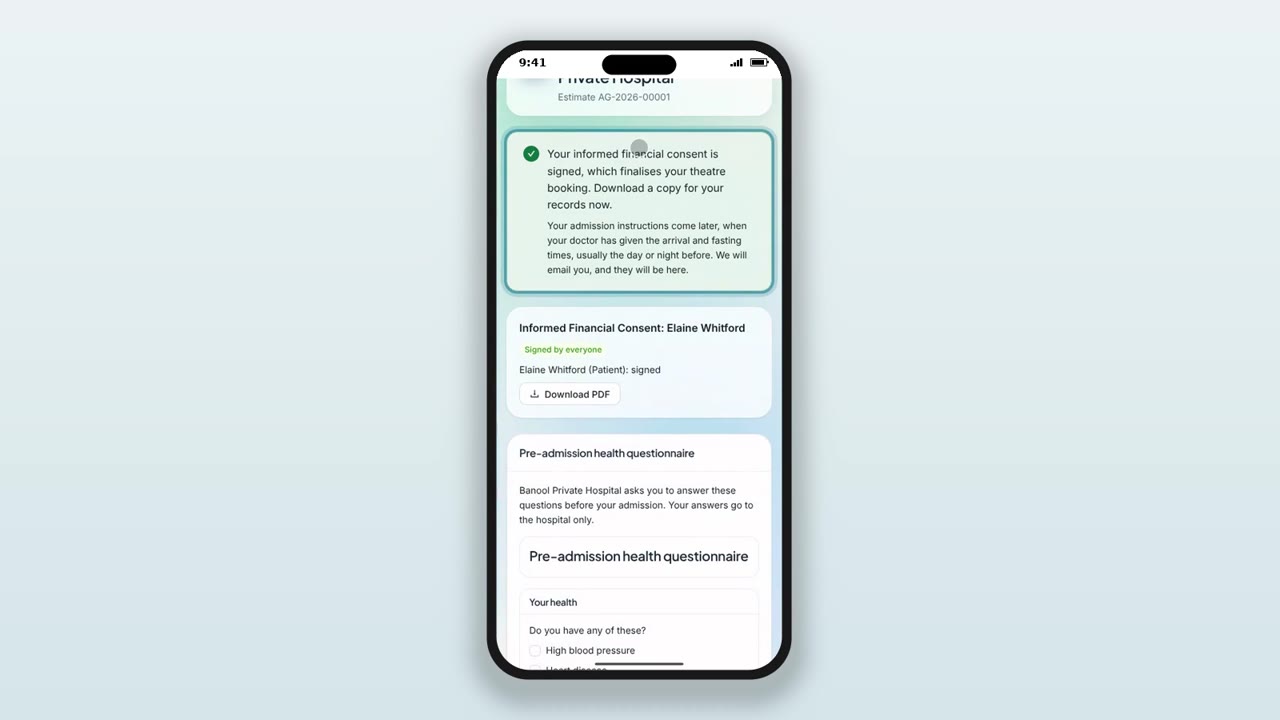
Informed financial consent, signed online, which finalises the theatre booking. A sealed copy goes to the patient.
Take the booking the way the rooms already work
Surgeons’ rooms book with you in their own way, usually by phone, email and fax. Hospital Purser gives each of them a link of their own.
Nothing re-keyed from the request
The rooms fill in the Request for Admission from their link: the operation, the date, the patient’s details and their fund. It arrives as a pre-admission in your workspace, with the patient’s health questionnaire beside it when you ask for one. You can stop a link at any time.
- A booking link for each surgeon’s rooms
- No account for the rooms to set up
- Each request arrives as a pre-admission
Tell the patient what they will pay, before they come in
Patients want to know what they will pay before they come in, and so does your accounts team.
Their cover, from their fund
The fund check goes to the patient’s health fund through Medicare Online, Services Australia’s claiming channel, from the details on the booking. Your workspace connects once, with its own Provider Digital Access device and Medicare facility number.
Until the Medicare Online certificate is issued, the check is simulated, labelled as simulated, and the estimate treats the patient’s cover as not checked.
Priced from your own contracts
Import your contracted rates with each fund once, and every estimate is priced from them, with your hospital charges and the Medicare Benefits Schedule items for the procedure. The estimate says what it assumes, so the patient and your team read the same figure the same way.
- Your contracted rates with each fund, seen only by your workspace
- Hospital charges and Medicare Benefits Schedule items
- What the estimate assumes, written on it
Consent signed, and everything in your records on the day
Signed online, sealed for both of you
The patient opens their invitation, enters the code sent to them, reads the estimate and gives their consent online. Signing the consent finalises the theatre booking. The signed consent is sealed with its fingerprint, and the patient keeps a copy. The admission and fasting instructions come later, as a second step: your staff send them from your own mailbox when the surgeon or anaesthetist has given the times, usually the day or night before.
Into your own system on the day
When the patient is admitted, the booking is marked admitted and downloads as one file into your own records: the signed consent, the estimate, the fund check and the request from the rooms. Hospital Purser keeps a signed consent until it is downloaded, so none is lost.
What hospitals ask us first
| Question | Answer |
|---|---|
| Can I use it today? | Not yet: Hospital Purser is not on sale in self-serve signup. Register interest and we will set your workspace up with you. |
| Are fund checks real yet? | Not yet. HealthOS’s Medicare Online claiming passed Notice of Integration testing with Services Australia on 20 November 2026, and the certificate is to be issued. Until then every fund check is simulated, and labelled as simulated. |
| What do I need to connect? | Your organisation’s Provider Digital Access device, linked to the Medicare Online claiming program, and each hospital’s Medicare facility number. The set-up walks through each step. |
| Do I need to replace my patient administration system? | No. Hospital Purser stands on its own, and at admission everything downloads into the system you already use. |
| Where is the data kept? | In Microsoft Azure in Australia, in a tenancy that the database itself keeps apart from every other subscriber’s. |
Every booking ready before the patient arrives
Hospital Purser is for private hospitals and day procedure centres. Tell us about your hospital and register your interest.