
Post your own JSON to a signed webhook
By the end, your system posts its own JSON event to a HealthOS channel, signed with a timestamp, retries it safely with an Idempotency-Key, and keeps working while the provider rotates the secret. The event lands on the resident’s record. Allow under an hour once the provider has a channel ready.
You will need
- Something that can POST JSON over HTTPS and compute an HMAC-SHA256. Our script uses Node.js 18 or later.
- A sample of the JSON you send, with the identifier you hold for the person.
- A stable id for each event, to use as the Idempotency-Key.
- The provider’s HealthOS administrator, to build and map the channel.
Before you start
You don’t have to change your payload to suit us. The provider maps your JSON in the channel, field by field, so you send the shape you already have. What you do have to get right is the signature, the timestamp and the retry key, and those are the same on every flow webhook.
The example is an allergy event from a pharmacy system, for a demo resident, Harold O’Brien (MRN CHL-DEMO-004), run against a local HealthOS with demo data. Hosts, tokens and secrets are placeholders.
Set it up
-
Create the webhook channel
Provider administratorA channel that writes into the record stages what it receives on a connection, then promotes it. The provider sets that up once, exactly as in steps 1 to 6 of the FHIR walkthrough: a connection, an ingress channel, a promotion template for the kind of record, auto-promotion on a schedule, and the channel switched to a Webhook trigger. For this example we added a second webhook channel to the same connection, so the two feeds promote into the same allergy list. The channel appears in Interoperability → Integration Flows:
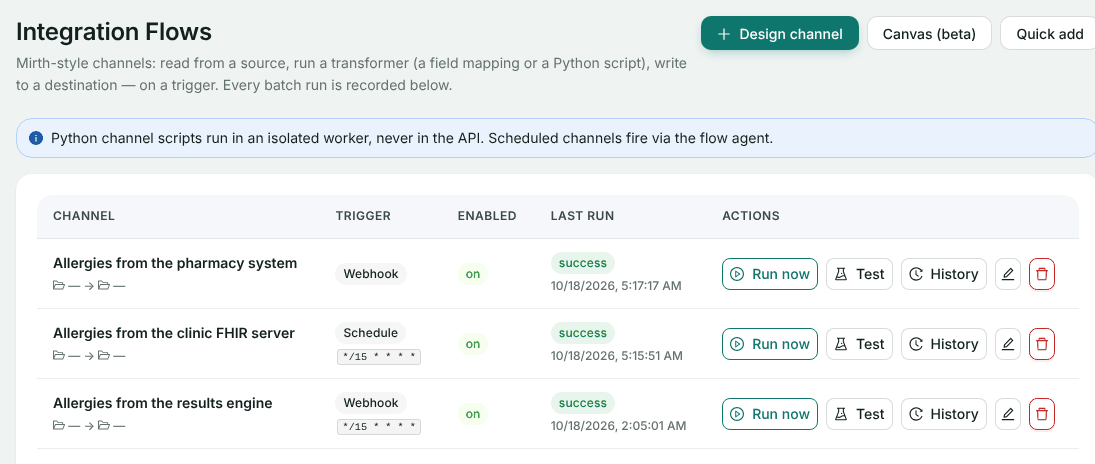
Our channel is the first row. The other two come from the FHIR and pull walkthroughs. -
Map your JSON
Provider administratorIn the channel’s editor, paste a sample of your payload into Fields from a sample payload and click Derive fields. HealthOS lists every path in it, ready to copy into a mapping.
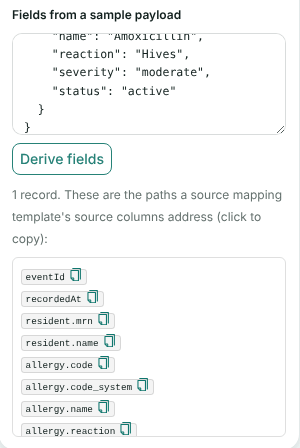
Nested objects become dotted paths. The provider then adds a Field mapping transform step whose template turns those paths into the fields the promotion template expects. Ours:
Your field HealthOS field resident.mrnmrn, which matches the personallergy.code,allergy.code_system,allergy.namecode_value,code_system,code_displayallergy.reaction,allergy.severity,allergy.statusreaction_manifestation,reaction_severity,clinical_statusrecordedAtrecorded_dateFields you send and nobody maps, like
eventIdhere, are ignored. Click Save changes. -
Send the URL and the secret to the vendor
Provider administratorThe channel’s source block shows the Webhook URL and the signing secret. Send both to the vendor over a channel you both trust.
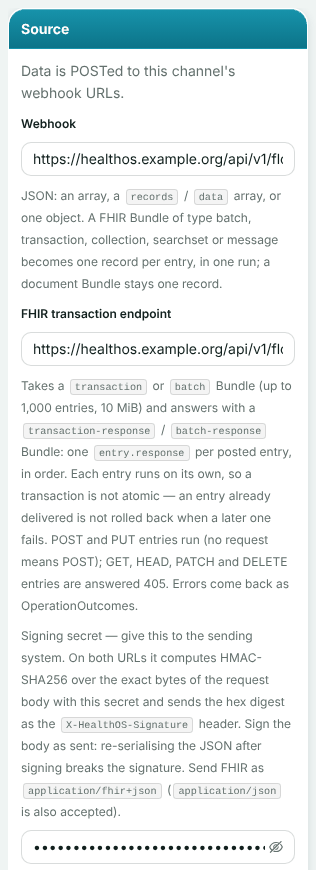
Use the plain Webhook URL for your own JSON. We have replaced the host and token, and hidden the secret.
Send and retry
-
Sign the event and post it
YouOur event:
{"eventId":"rx-evt-20261018-000412","recordedAt":"2026-10-18T09:20:00+10:00",
 "resident":{"mrn":"CHL-DEMO-004","name":"Harold O'Brien"},
 "allergy":{"code":"294505008","code_system":"http://snomed.info/sct","name":"Amoxicillin",
            "reaction":"Hives","severity":"moderate","status":"active"}}
Take the current time in Unix seconds, compute a hex HMAC-SHA256 with the secret over
{timestamp}.{body}, and send both in headers. Sign the bytes you send, after serialising. Use your own id for the event as theIdempotency-Key:// sign-and-send.mjs import { createHmac } from 'node:crypto'; import { readFileSync } from 'node:fs'; const [url, secret, file, idempotencyKey] = process.argv.slice(2); const body = readFileSync(file, 'utf8'); const timestamp = Math.floor(Date.now() / 1000).toString(); const signature = createHmac('sha256', secret).update(`${timestamp}.${body}`).digest('hex'); const res = await fetch(url, { method: 'POST', headers: { 'Content-Type': 'application/json', 'X-HealthOS-Timestamp': timestamp, 'X-HealthOS-Signature': signature, 'Idempotency-Key': idempotencyKey, }, body, }); console.log(res.status, res.headers.get('idempotent-replayed') ?? ''); console.log(await res.text());node sign-and-send.mjs https://healthos.example.org/api/v1/flow-webhooks/{token} \ "$SIGNING_SECRET" event.json rx-evt-20261018-000412The channel runs as soon as the request arrives, and answers with the run:
HTTP/1.1 202 Accepted
Content-Type: application/json; charset=utf-8

{
  "success": true,
  "data": {
    "runId": "e3286955-0c4b-4c30-a03e-2f9e714a9954",
    "status": "success",
    "recordsIn": 1,
    "recordsOut": 1,
    "recordsFailed": 0
  }
}
A body can also be an array, or an object with a
recordsordataarray. Each element becomes a record in the same run. -
Retry with the same key
YouWhen a request times out or comes back 5xx, send it again with the same
Idempotency-Key, with backoff. Re-sign it with a fresh timestamp. Within 24 hours, a key HealthOS has already seen gets the first answer back and runs nothing:HTTP/1.1 202 Accepted Idempotent-Replayed: true { "data": { "runId": "e3286955-0c4b-4c30-a03e-2f9e714a9954", "status": "success", "recordsIn": 1, "recordsOut": 1, "recordsFailed": 0 }, "success": true }Same
runId, no second run. If the first delivery is still running when the retry arrives, you get a409 IDEMPOTENCY_IN_PROGRESS: wait and try again. -
See the runs
Provider administratorOn Integration Flows, click History on the channel and expand a run.
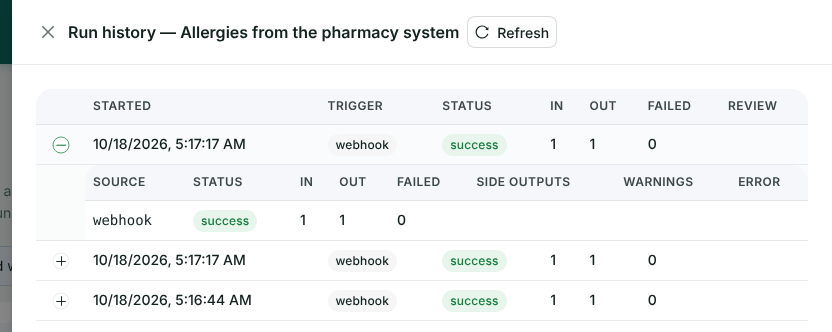
Three deliveries with three different keys. The replayed retry isn’t here, because it ran nothing.
Rotate the secret
-
Rotate
Provider administratorThere is no button for this in HealthOS Admin yet. The administrator calls the admin API with their own signed-in session, naming
secret,tokenorboth:POST /api/v1/admin/flows/{channel id}/webhook/rotate Authorization: Bearer {administrator's session token} Content-Type: application/json { "target": "secret" } HTTP/1.1 200 OK { "success": true, "data": { "webhookToken": "{token}", "webhookPath": "/api/v1/flow-webhooks/{token}", "webhookSecret": "{new signing secret}", "previousTokenValidUntil": null, "previousSecretValidUntil": "2026-10-19T05:17:17.722Z" } }The old secret keeps working until
previousSecretValidUntil, 24 hours later. The administrator sends the vendor the new one. -
Switch over
YouStart signing with the new secret whenever you’re ready inside the 24 hours. We sent one event signed with each straight after rotating, and both were accepted with
202. Rotating again within those 24 hours retires the first rotation’s old values straight away, so finish one switch before starting another.
Check it worked
- Your first delivery gets
202with"status": "success"and arunId. - A retry with the same key gets the same
runIdandIdempotent-Replayed: true. - Both secrets work during the overlap after a rotation.
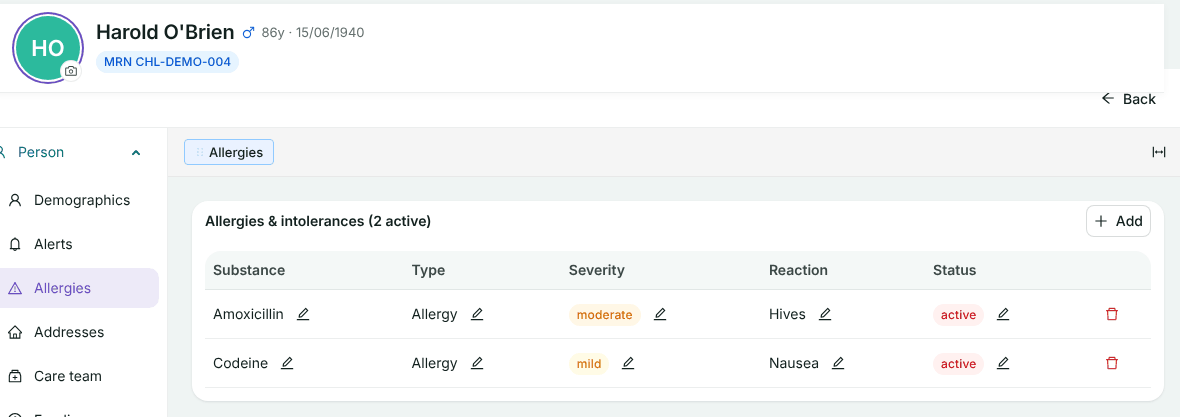
- After the provider’s next promotion run, the allergy is on the resident’s record, under Person → Allergies:
If something goes wrong
Every refusal uses one envelope, { "success": false, "error": { "code", "message" }, "meta": { "requestId", "timestamp" } }. Branch on the code. The first three rows are answers we got.
| What you see | Why | What to do |
|---|---|---|
401 SIGNATURE_INVALID, “Invalid signature” | Wrong secret, or the body changed after you signed it | Sign the exact bytes you send, with the secret the provider gave you |
401 TIMESTAMP_EXPIRED, “X-HealthOS-Timestamp is outside the accepted window (300s old, 60s ahead)” | The timestamp is more than five minutes old or a minute ahead | Re-sign every attempt with the current time. Check your clock |
404 WEBHOOK_UNKNOWN, “Unknown webhook” | The token is wrong, or was rotated more than 24 hours ago | Ask the provider for the current URL |
401 TIMESTAMP_INVALID | The timestamp header isn’t Unix seconds | Send whole seconds, not milliseconds |
400 IDEMPOTENCY_KEY_INVALID | The key is empty, longer than 255 characters or not printable ASCII | Use your event id |
409 IDEMPOTENCY_IN_PROGRESS | The first delivery with this key is still running | Wait and retry with the same key |
500 RUN_FAILED | The channel failed. Nothing is kept against the key, so a retry runs again | Retry with backoff. Tell the provider if it keeps failing |
Related
Already sending webhooks elsewhere?
Show us the payload. Often the only work is a mapping on the provider’s side and a signature on yours.