
Send worked shifts and device readings in our formats
For rostering and remote monitoring systems we have written the format down, so there is no mapping to build. By the end, your rostering system’s shifts appear on the provider’s Rostering feed, with anything that can’t be counted held for staff, and your monitoring platform’s readings are stored against the right person. Allow half an hour for each.
You will need
- Something that can POST JSON over HTTPS and compute an HMAC-SHA256. The
sign-and-send.mjsscript from the webhooks walkthrough does both. - For shifts: your employee numbers, pay codes and site codes, and the provider’s list of which site is which facility.
- For readings: a stable account id for each person on your platform, and an id for each reading.
- The provider’s HealthOS administrator, to install the connector and agree a signing secret with you.
Before you start
Both contracts sign the same way as every HealthOS webhook: a hex HMAC-SHA256 of {timestamp}.{body} in X-HealthOS-Signature, with the Unix time in X-HealthOS-Timestamp. Unlike a flow webhook, the signing secret is one the provider’s administrator types into the connector, at least 16 characters, so agree it with them and keep it out of email.
We ran both against a local HealthOS with the demo aged care tenant, St Dorothy Living, and its facility Harbourlight Bayswater. Hosts, tokens and secrets are placeholders.
Worked shifts
The full field list, the JSON Schema and the pull contract are in Webhooks and contracts. Here is the push, end to end.
-
Install the rostering connector
Provider administratorIn HealthOS Admin, go to Interoperability → Marketplace, search for
HealthOS formatand click Install on Rostering system (HealthOS format).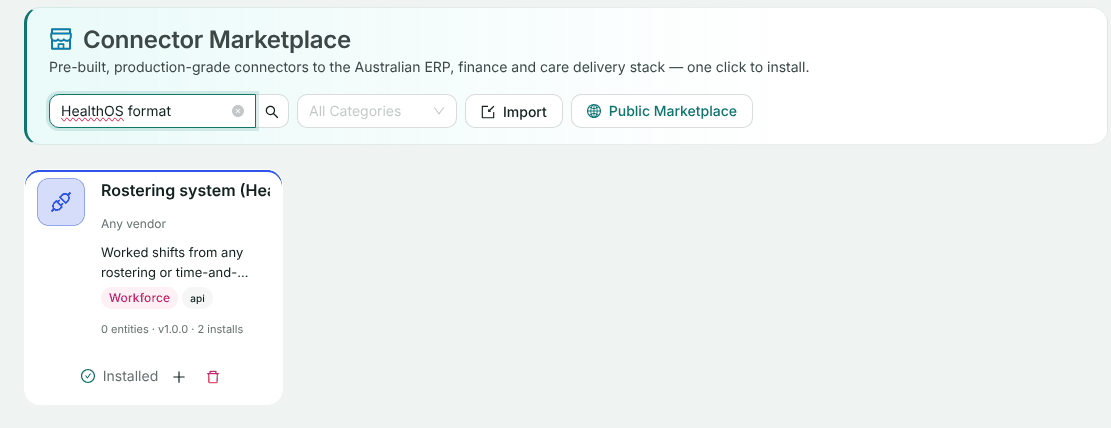
Set Mode to Live (vendor tenant) and enter the agreed Webhook signing secret. Check Site time zone: shift times are the site’s wall-clock time. Leave Scheduled pull off for a push-only feed. Click Next through Test connection and Webhook and sites, then Complete Setup.
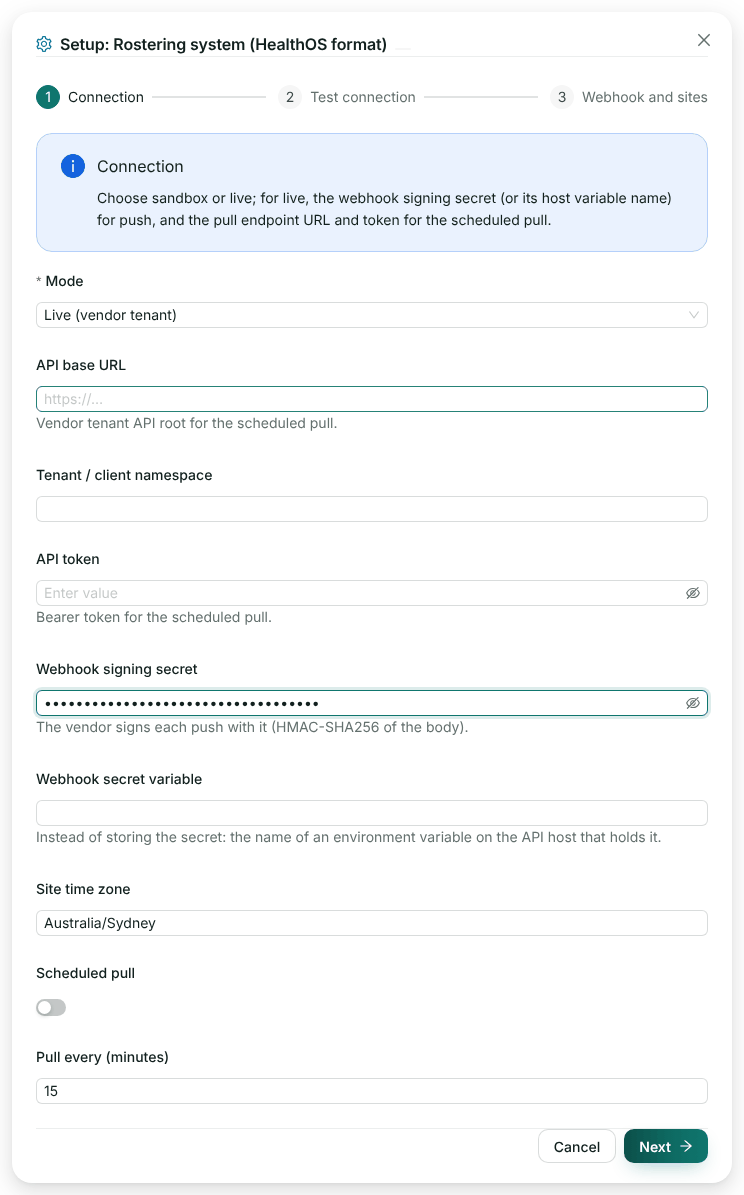
Sandbox mode generates shifts from the provider’s own staff instead, with no vendor involved. It is a good way to show the flow before your system is ready. -
Map your site codes and send the URL
Provider administratorGo to Interoperability → Integration Topology, open the connector, click Edit configuration, then click the connector’s card on the right and choose Rostering, webhook and sites. Under Sites → facilities, enter each site code your system sends, pick the facility and click Map site. The panel also shows the Webhook URL: copy it for the vendor.
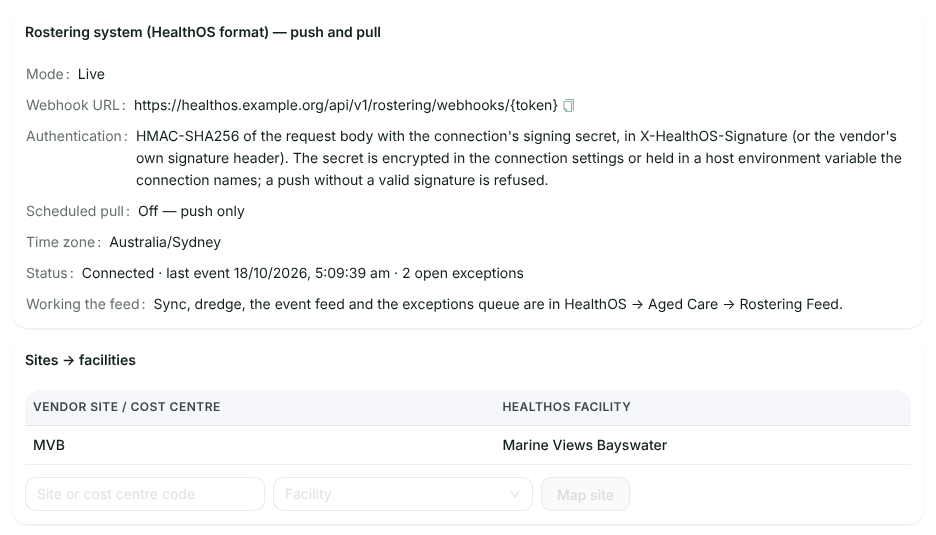
Site MVBmapped to Harbourlight Bayswater. A shift for a site with no mapping is held as an exception. -
Push a batch of shifts
YouUp to 1,000 shifts go in one body. Ours has a night shift, an afternoon shift and an agency afternoon:
{
  "shifts": [
    { "vendorShiftId": "RS-20261016-2300-E3001", "revision": "2026-10-17T08:00:00Z",
      "workerId": "E3001", "workerName": "Harriet Osei", "positionCode": "Registered Nurse",
      "payCode": "RN ORD", "shiftDate": "2026-10-16", "startTime": "23:00", "endTime": "07:30",
      "breakMinutes": 30, "siteCode": "MVB" },
    { "vendorShiftId": "RS-20261017-1500-E3002", "revision": "2026-10-17T23:05:00Z",
      "workerId": "E3002", "workerName": "Daniel Fitzgerald", "positionCode": "Registered Nurse",
      "payCode": "RN ORD", "shiftDate": "2026-10-17", "startTime": "15:00", "endTime": "23:30",
      "breakMinutes": 30, "siteCode": "MVB" },
    { "vendorShiftId": "RS-20261017-1500-A9177", "revision": "2026-10-17T23:10:00Z",
      "workerId": "A9177", "workerName": "Jordan Price", "payCode": "AGENCY PCA",
      "shiftDate": "2026-10-17", "startTime": "15:00", "endTime": "23:00",
      "breakMinutes": 30, "siteCode": "MVB", "agencyName": "Agency staff" }
  ]
}
node sign-and-send.mjs https://healthos.example.org/api/v1/rostering/webhooks/{token} \ "$SIGNING_SECRET" shifts.jsonThe answer tallies what happened to each shift:
HTTP/1.1 202 Accepted

{
  "success": true,
  "data": {
    "received": 3,
    "duplicateDeliveries": 2,
    "created": 1,
    "amended": 0,
    "unchanged": 0,
    "held": 0,
    "deleted": 0,
    "rejected": 0,
    "ignored": 0
  }
}
We had sent the first and last shifts once before, when both were held. This time they counted as
duplicateDeliveriesand nothing was done, and the new shift wascreated. A shift that is held is not an error: it is counted once someone resolves it, and you don’t resend it. To change a shift, send the samevendorShiftIdwith a laterrevision. To remove one, send it with"action": "delete". -
Work the feed and its exceptions
Provider staffIn HealthOS, go to Aged Care → Rostering feed. The Event feed lists each shift as it arrived. The Exceptions queue holds the ones that can’t be counted as they stand, each with the action that clears it.
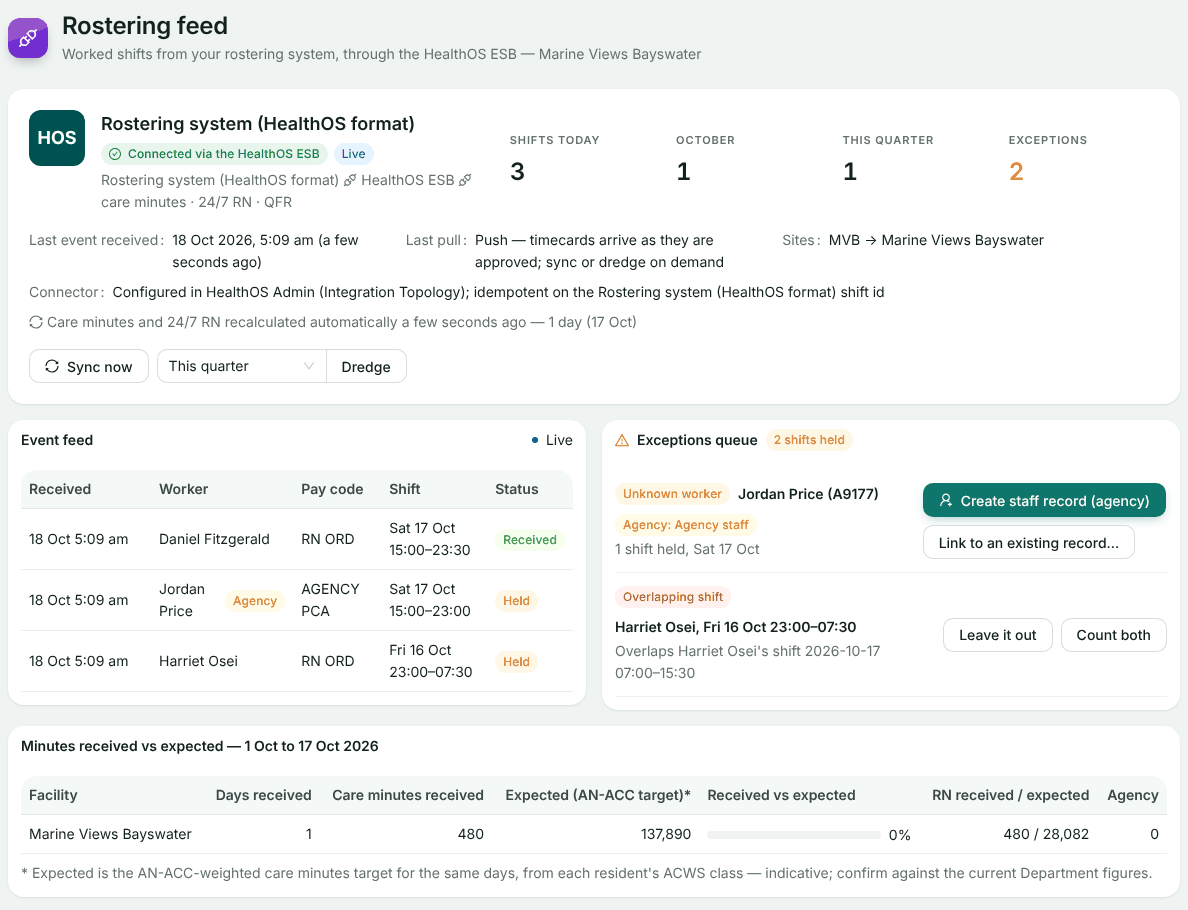
Jordan Price isn’t a staff record yet, and Harriet Osei’s night shift overlaps her rostered morning. The received shift already counts towards care minutes and 24/7 RN.
Device readings
-
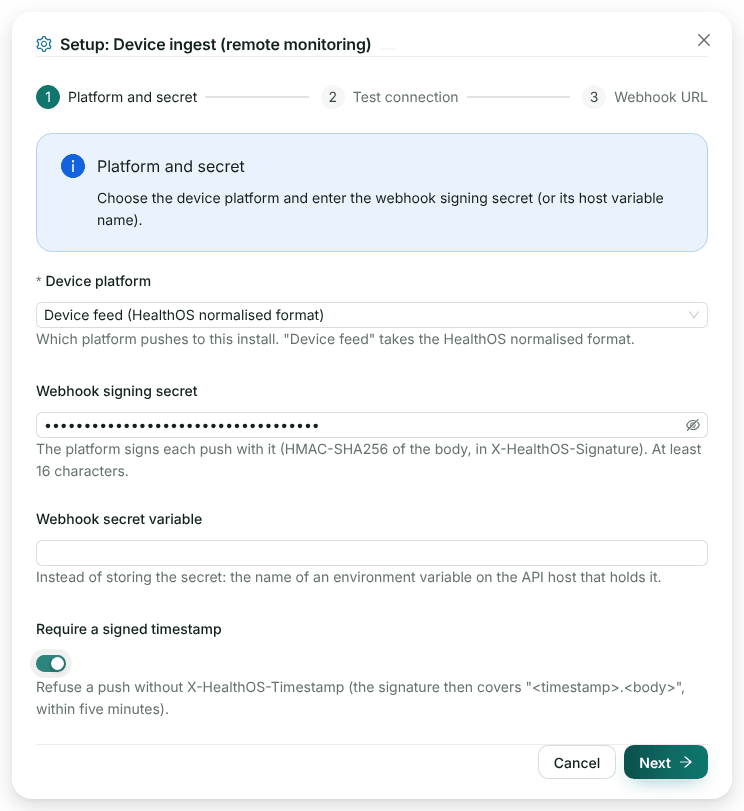
Install the device ingest connector
Provider administratorIn Interoperability → Marketplace, install Device ingest (remote monitoring). Set Device platform to Device feed (HealthOS normalised format), enter the agreed Webhook signing secret, and switch on Require a signed timestamp so an unsigned or replayed push is refused. Click Next through to Complete Setup.
The connector’s card in Integration Topology opens a Device ingest, webhook page with the URL to give the vendor:
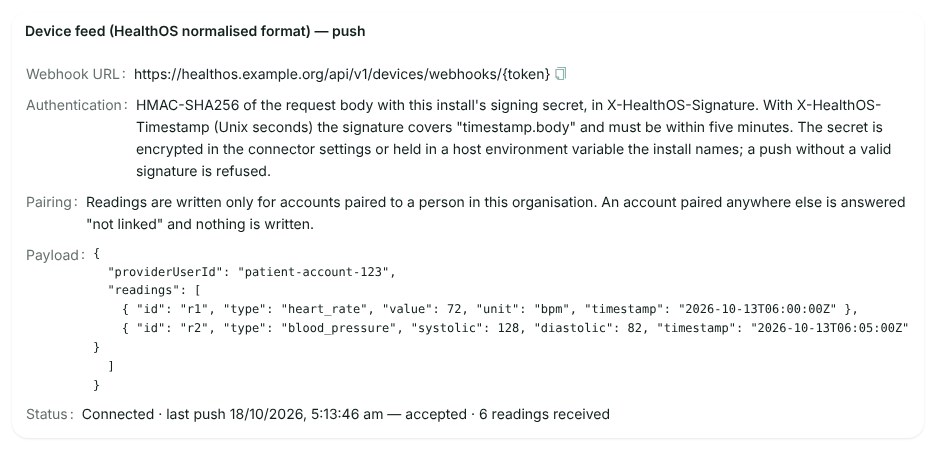
After our pushes. The status line shows the outcome of the last push. -
Pair each account to a person
Provider administratorReadings are written only for an account the provider has paired to a person in their organisation. There is no screen for pairing yet: the provider’s team pairs an account through the HealthOS API, signed in as staff, with your account id and their person id:
POST /api/v1/connectors/external/generic/link Authorization: Bearer {staff session token} Content-Type: application/json { "personId": "e2e00001-0000-0000-0000-000000000002", "providerUserId": "mvb-resident-0002" } HTTP/1.1 200 OK { "success": true, "data": { "id": "814729e1-…", "provider": "generic", "providerUserId": "mvb-resident-0002" } } -
Push readings
YouUp to 5,000 readings go in one body, for one account. Give each reading your own id:
{
  "providerUserId": "mvb-resident-0002",
  "readings": [
    { "id": "mvb-0002-20261018-0300-hr", "type": "heart_rate", "value": 88, "unit": "bpm", "timestamp": "2026-10-18T03:00:00Z" },
    { "id": "mvb-0002-20261018-0301-bp", "type": "blood_pressure", "systolic": 142, "diastolic": 86, "unit": "mmHg", "timestamp": "2026-10-18T03:01:00Z" },
    { "id": "mvb-0002-20261018-0302-spo2", "type": "oxygen_saturation", "value": 95, "unit": "%", "timestamp": "2026-10-18T03:02:00Z" },
    { "id": "mvb-0002-20261018-0303-glu", "type": "blood_glucose", "value": 126, "unit": "mg/dL", "timestamp": "2026-10-18T03:03:00Z" },
    { "id": "mvb-0002-20261018-0304-wt", "type": "weight", "value": 61.4, "unit": "kg", "timestamp": "2026-10-18T03:04:00Z" },
    { "id": "mvb-0002-20261018-0305-x", "type": "skin_conductance", "value": 4.2, "unit": "uS", "timestamp": "2026-10-18T03:05:00Z" }
  ]
}
node sign-and-send.mjs https://healthos.example.org/api/v1/devices/webhooks/{token} \ "$SIGNING_SECRET" readings.json HTTP/1.1 200 OK { "success": true, "data": { "linked": true, "inserted": 6, "skipped": 0, "unsupported": 1, "alertsCreated": 1, "deteriorationAlertsCreated": 0 } }The blood pressure counts as two readings, systolic and diastolic.
skin_conductanceisn’t a type we know, so it was counted asunsupportedand set aside, and the rest were kept. The glucose was converted to 6.99 mmol/L on the way in. The systolic of 142 raised a monitoring alert against the provider’s threshold of 140.Sending the same body again changed nothing (
"inserted": 0, "skipped": 6), because each reading’s id is recorded. An account that isn’t paired gets a202with"linked": falseand nothing is written, so retries don’t pile up.
Check it worked
- Shifts: the tally adds up to
received, and the Rostering feed lists every shift, with the held ones in the exceptions queue. - Readings: the response says
"linked": true, the device ingest page says the last push was accepted, and the provider can read the readings and alerts back for the person:
GET /api/v1/persons/{person id}/wearables/readings?limit=10

{ "data": [
  { "readingType": "weight", "value": 61.4, "unit": "kg", "recordedAt": "2026-10-18T03:04:00.000Z",
    "dataQuality": "good",
    "metadata": { "vendor": "generic", "external_id": "mvb-0002-20261018-0304-wt",
                  "provider_user_id": "mvb-resident-0002" } },
  { "readingType": "blood_glucose", "value": 6.99, "unit": "mmol/L", … },
  … ] }

GET /api/v1/persons/{person id}/wearables/alerts

{ "data": [ { "readingType": "blood_pressure_systolic", "severity": "warning",
  "message": "blood pressure systolic reading of 142 mmHg is outside normal range (threshold: 140 mmHg)" } ] }
One honest note: in this release the chart’s Wearable Vitals tab lists readings only for a device registered on the person, so readings that arrive through a paired platform account don’t show there yet. They are stored and alerted on, as above.
If something goes wrong
| What you see | Why | What to do |
|---|---|---|
422 PAYLOAD_INVALID, “2 invalid fields: shifts[0].startTime is required; shifts[0].startime is not a field of the HealthOS format” | A shift breaks the format. We sent startime by mistake. Nothing in the body was staged | Fix every listed field and resend the whole body |
A shift counted under held | Unknown worker, unmapped site or pay code, an overlap, or an implausible shift | Nothing on your side. Staff resolve it on the Rostering feed |
A shift counted under ignored | Its revision is older than the one HealthOS holds | Send a later revision |
Readings: 202 with "linked": false | The account isn’t paired to a person in this organisation | Ask the provider to pair it |
Readings counted under unsupported | A reading type we don’t know yet | Tell us. The rest of the body was kept |
| 401 on either endpoint | Missing or wrong signature, or a timestamp outside five minutes | Sign {timestamp}.{body} with the agreed secret, fresh for every attempt |
| 503 on either endpoint | The connector has no signing secret yet | The provider sets one in the connector |
Related
Building to one of our formats?
Tell us which. We’ll set up a test organisation with the connector installed, so you can push to it from day one.