
Send HL7 v2 results and vital signs over MLLP
By the end, your sender delivers ORU^R01 lab results and vital signs to a HealthOS listener, gets an ACK for each, and the vitals are on the resident’s chart with a NEWS score. Allow an hour once the listener’s port is open. The provider’s platform and HealthOS administrators do the set-up. You send messages.
You will need
- An MLLP sender: your interface engine, or the small Node.js client below for testing.
- Network reach to the provider’s HL7 listener port, ideally over TLS.
- The identifiers your PID-3 carries (MRN, IHI or Medicare number) for a test person the provider holds.
- Your MSH-4 and MSH-6 values, and the message types you send.
Before you start
Live MLLP reception runs in a separate HealthOS component, the HL7 gateway, which opens one TCP port per connector. Installing the connector doesn’t open a port: the provider’s platform administrator deploys the gateway and reserves a port for your feed first. Locally we ran it with HL7_MLLP_ENABLED=true and port 55741. In a provider’s environment, ask them for the host and port.
Everything here was run against a local HealthOS with demo data, for a demo resident, Margaret Chen (MRN CHL-DEMO-002) at Harbourlight Bayswater.
Set it up
-
Install the HL7 connector
Provider administratorIn HealthOS Admin, go to Interoperability → Marketplace, search for
HL7and click Install on HL7 v2 (MLLP) Import.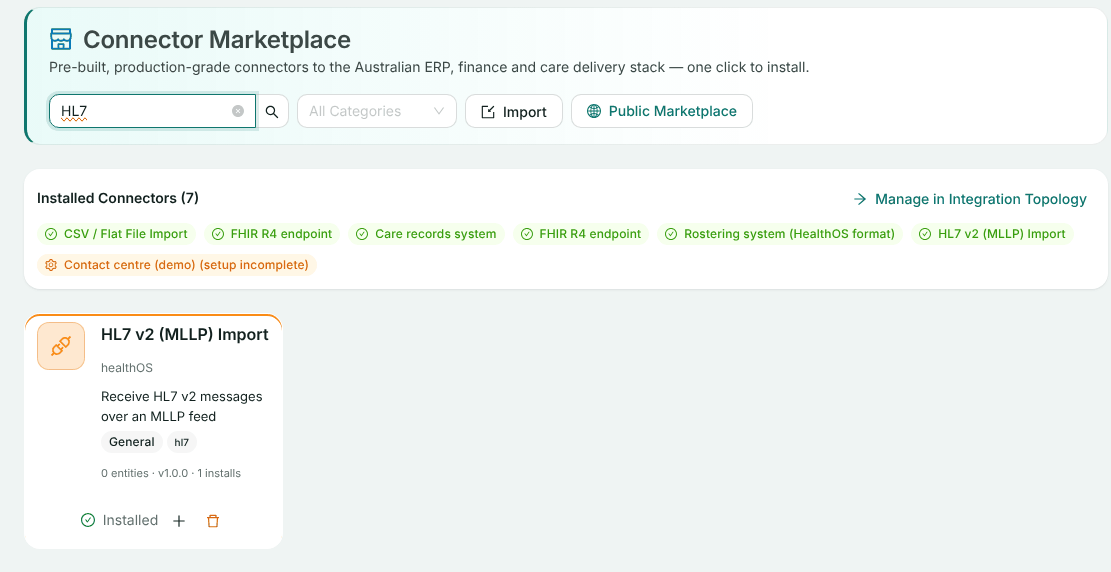
Switch on Enable live MLLP reception, enter the MLLP port the platform administrator reserved, and set Live message processing to File results (ORU^R01). With Stage only, messages are kept for mapping and promotion but nothing is filed. Click Next through the remaining steps and Complete Setup.
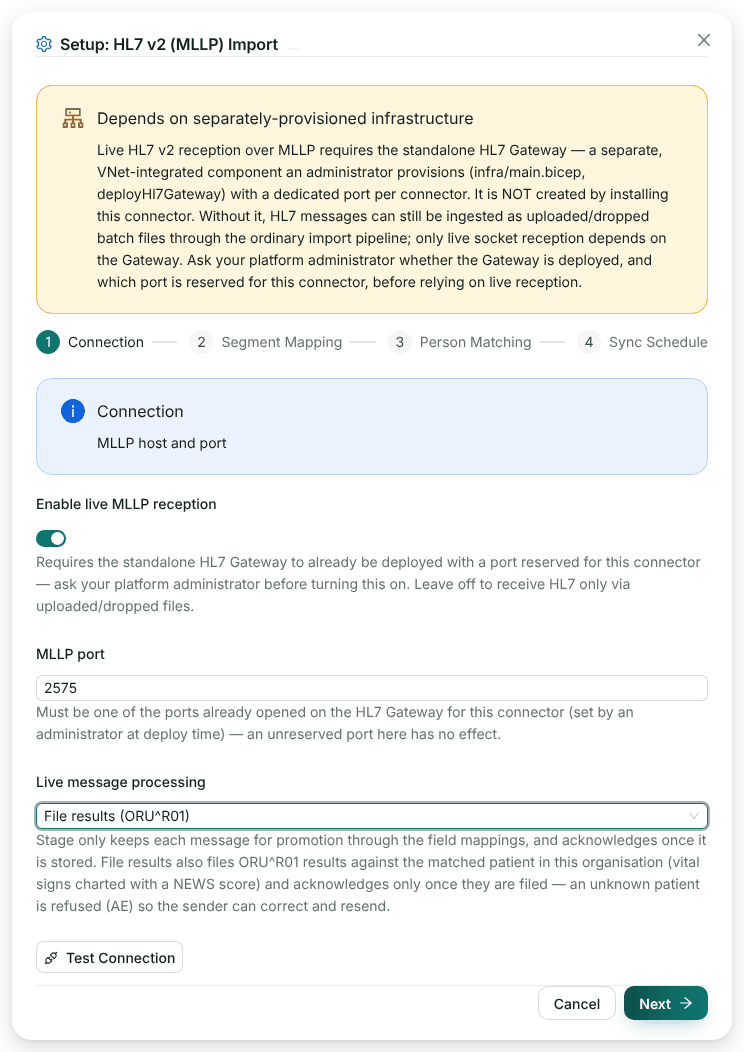
Port 2575 is the conventional MLLP port. Use the one you were given. -
Set the facility’s receiving code and message types
Provider administratorGo to Interoperability → HL7 v2.x, pick the organisation and the facility, and override three settings with Override then Save: Accept live HL7 for this facility on, Receiving facility code (MSH-6) set to the code you put in MSH-6, and Expected message types set to what you send.
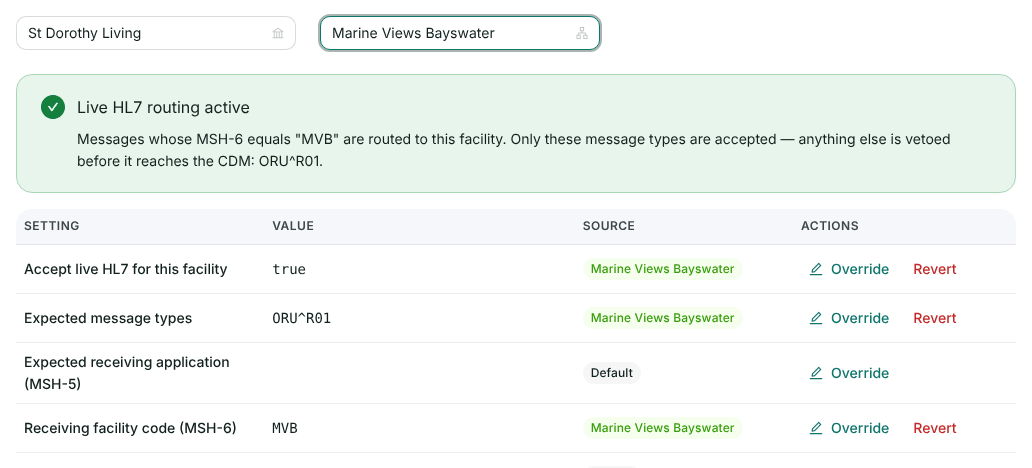
Messages with MSH-6 MVBare routed to this facility. Any type other than ORU^R01 is stopped before it reaches the record.
Send messages
-
Use an MLLP client
YouYour engine already speaks MLLP. To test from a laptop, this client frames a message with
0x0Bat the start and0x1C 0x0Dat the end, and prints the ACK:// mllp-send.mjs: send one HL7 v2 message over MLLP and print the ACK. // node mllp-send.mjs <host> <port> <message.hl7> import net from 'node:net'; import { readFileSync } from 'node:fs'; const [host, port, file] = process.argv.slice(2); // HL7 segments end in a carriage return. Accept a file saved with ordinary line endings. const message = readFileSync(file, 'utf8').trim().split(/\r?\n/).join('\r') + '\r'; const VT = Buffer.from([0x0b]); const FS_CR = Buffer.from([0x1c, 0x0d]); const socket = net.connect(Number(port), host, () => { socket.write(Buffer.concat([VT, Buffer.from(message, 'utf8'), FS_CR])); }); let received = Buffer.alloc(0); socket.on('data', (chunk) => { received = Buffer.concat([received, chunk]); const end = received.indexOf(FS_CR); if (end === -1) return; // wait for the whole frame console.log(received.subarray(1, end).toString('utf8').split('\r').filter(Boolean).join('\n')); socket.end(); }); socket.setTimeout(30000, () => { console.error('No ACK within 30 seconds'); socket.destroy(); }); socket.on('error', (err) => { console.error(err.message); process.exitCode = 1; });For TLS, swap
net.connectfortls.connectfromnode:tlswith your client certificate if the listener asks for one. -
Send a lab result
YouOne OBR with an OBX per result, LOINC codes as you have them, and the person in PID-3:
MSH|^~\&|COASTLAB|COASTPATH|HEALTHOS|MVB|20261018094500+1000||ORU^R01^ORU_R01|LAB-20261018-0001|P|2.4|||AL|NE|AUS
PID|1||CHL-DEMO-002^^^MVB^MR||CHEN^MARGARET||19420903|F
OBR|1|ORD-88112|LAB-55871|24326-1^Electrolytes panel^LN|||20261018080000+1000|||||||||||||||20261018094000+1000||CH|F
OBX|1|NM|2951-2^Sodium^LN||138|mmol/L|135-145|N|||F|||20261018080000+1000
OBX|2|NM|2823-3^Potassium^LN||6.4|mmol/L|3.5-5.2|HH|||F|||20261018080000+1000
OBX|3|NM|2160-0^Creatinine^LN||142|umol/L|45-90|H|||F|||20261018080000+1000
node mllp-send.mjs hl7.healthos.example.org 2575 oru-lab.hl7 MSH|^~\&|PAS-EMR|PAS-EMR|COASTLAB|COASTPATH|20261018014300||ACK|20261018014300|P|2.5 MSA|AA|LAB-20261018-0001|Message filed: 3 result(s), 0 vital signs set(s)MSA-2 is your MSH-10, so you can tie each ACK to its message. The three results were filed as structured results against the resident. The potassium of 6.4 flagged
HHalso raised a critical-result notification for the treating team. -
Send vital signs
YouVital signs travel in an ORU^R01 too, with LOINC vital sign codes. One OBR group is one set:
MSH|^~\&|VITALSCART|MVB-WARD2|HEALTHOS|MVB|20261018101500+1000||ORU^R01^ORU_R01|VS-20261018-0042|P|2.4|||AL|NE|AUS
PID|1||CHL-DEMO-002^^^MVB^MR||CHEN^MARGARET||19420903|F
OBR|1||VS-0042|85353-1^Vital signs panel^LN|||20261018101200+1000||||||||||||||||||F
OBX|1|NM|8867-4^Heart rate^LN||112|/min|||||F|||20261018101200+1000
OBX|2|NM|9279-1^Respiratory rate^LN||24|/min|||||F|||20261018101200+1000
OBX|3|NM|8480-6^Systolic blood pressure^LN||98|mm[Hg]|||||F|||20261018101200+1000
OBX|4|NM|8462-4^Diastolic blood pressure^LN||60|mm[Hg]|||||F|||20261018101200+1000
OBX|5|NM|59408-5^Oxygen saturation^LN||93|%|||||F|||20261018101200+1000
OBX|6|NM|8310-5^Body temperature^LN||38.4|Cel|||||F|||20261018101200+1000
MSH|^~\&|PAS-EMR|PAS-EMR|VITALSCART|MVB-WARD2|20261018014300||ACK|20261018014300|P|2.5 MSA|AA|VS-20261018-0042|Message filed: 0 result(s), 1 vital signs set(s)The codes we chart as vital signs include heart rate
8867-4, respiratory rate9279-1, blood pressure8480-6and8462-4(or the panel85354-9), oxygen saturation59408-5or2708-6, temperature8310-5, weight29463-7, glucose2339-0or15074-8, and GCS9269-2. Anything we can’t chart with confidence is filed as a structured result instead. -
See a refusal
YouWe sent the lab message again for an MRN the organisation doesn’t hold:
MSA|AE|LAB-20261018-0002|Patient not matched
ERR||PID^1^3|204^Unknown key identifier^HL70357|E||||No matching person found in the receiving organisation for identifier types: MRN
Nothing was filed against a guess. Fix the identifier and resend.
-
See what arrived
Provider administratorEvery message is kept as an audit copy before it is filed. On the connector’s overview in Integration Topology, Staged data lists them:
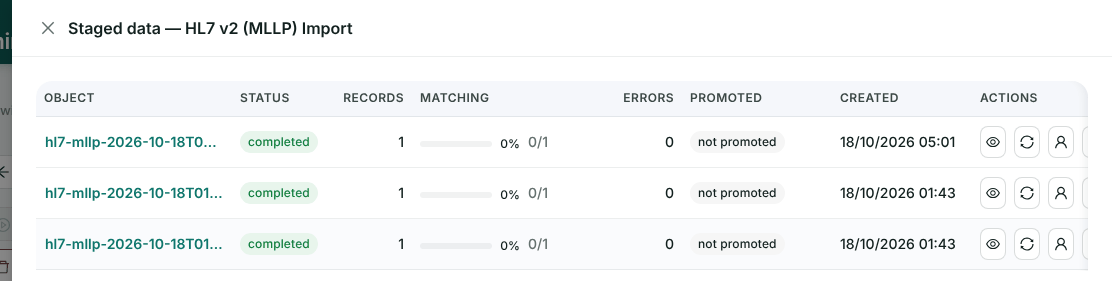
One entry per message received. In File results mode the filing happens straight away, so these copies show no matching or promotion of their own.
TLS
MLLP has no security of its own. Any feed that leaves a private link should run over TLS. The platform administrator turns TLS on for the listeners with environment variables on the HL7 gateway:
HL7_MLLP_TLS_CERT_PATHandHL7_MLLP_TLS_KEY_PATH: the server certificate (PEM, chain allowed) and its key. Set both or neither.HL7_MLLP_TLS_CA_PATHwithHL7_MLLP_TLS_REQUIRE_CLIENT_CERT=true: mutual TLS, where your client certificate must chain to that CA.HL7_MLLP_TLS_MIN_VERSION:TLSv1.2(the default) orTLSv1.3.
A listener configured for TLS never falls back to plain TCP. We ran plain MLLP locally, so the exchanges above were not over TLS.
Check it worked
- Each message gets
MSA|AAwith your control id, and the text counts what was filed. - The provider sees one audit copy per message under Staged data.
- In HealthOS, the resident’s chart summary shows the vital signs set, with its NEWS score:
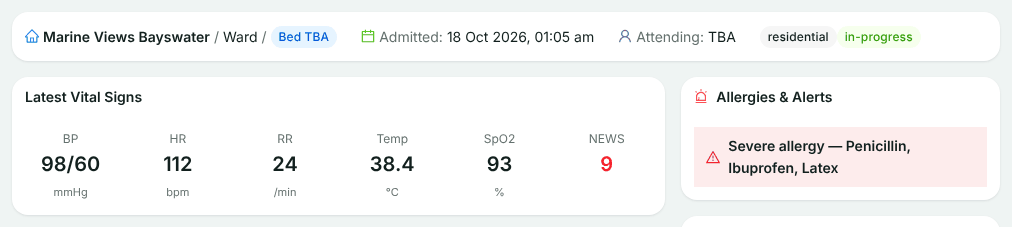
In this release the chart’s Results tab doesn’t list results that arrive over HL7 yet. They are stored, and the ACK counts them.
If something goes wrong
| What you see | Why | What to do |
|---|---|---|
MSA|AE, “Patient not matched” | No person in the organisation has the PID-3 identifiers you sent | Check PID-3 and its type codes (MR, NI, MC). Send the MRN with its assigning facility |
MSA|AE, “Duplicate file: this file was already uploaded as cube …” | You resent a byte-for-byte identical message. It was filed the first time | Treat it as delivered. Don’t page anyone about this one |
MSA|AR | The message couldn’t be parsed, or it’s a type this feed doesn’t take | Check segment separators are carriage returns and the type is one the provider expects |
| Connection refused or no ACK | The port isn’t open on the gateway, or live reception is off on the connector | Ask the provider’s platform administrator which port is reserved for you |
| TLS handshake fails | The listener needs a client certificate, or a newer TLS version | Present a certificate from the CA the provider named |
Related
Send us a sample feed
A day of de-identified messages is enough for us to show you how they will land.