
Let HealthOS read from your system
When your system can’t push, HealthOS comes and gets it. By the end, HealthOS reads your REST API on a schedule, searches your FHIR server with OAuth 2 client credentials, takes an extract file, and files what it reads on the right residents. Allow an afternoon for all four. The provider’s HealthOS administrator does the set-up. You provide an endpoint and a credential.
You will need
- An https endpoint HealthOS can reach from the internet, or a database it can reach over a private link.
- A credential for HealthOS alone: an API key or token, an OAuth 2 client id and secret, or a read-only database account.
- The identifier each of your records carries for the person, such as the provider’s MRN.
- The provider’s HealthOS administrator.
Before you start
Whatever HealthOS reads, it lands first: in a mirror of your tables, or in staging. A mapping then turns your fields into HealthOS fields, the person is matched on your identifier, and a promotion writes the result to the record. Nothing you return goes straight into a chart.
To try this without touching a real system, we ran a small mock source on our machine: a JSON API at /api that takes a bearer token, and a FHIR R4 server at /fhir behind an OAuth 2 token endpoint. We point at it as http://127.0.0.1:3121 in the screenshots. Your address will be https. The residents are demo data.
Your REST API
HealthOS reads a JSON API as a set of tables, through its replication pipeline: it lands each endpoint as a mirror table (bronze), types it (silver), then maps it to a kind of record (gold).
-
Add your API as a source
Provider administratorIn HealthOS Admin, go to Interoperability → Integration Topology, click Add system and choose Replication source (table mirror). Set Source Type to HTTP / API and fill in:
- Mirror Schema: a short name for this source’s tables.
- Base URL and the Authorization Header HealthOS should send, for example
Bearer {your API token}. - Objects: the endpoint paths to read, comma separated.
- Since Param: your “changed since” query parameter, and Rows Path: the key holding the array of rows.
- Schedule (cron), and Enabled on.
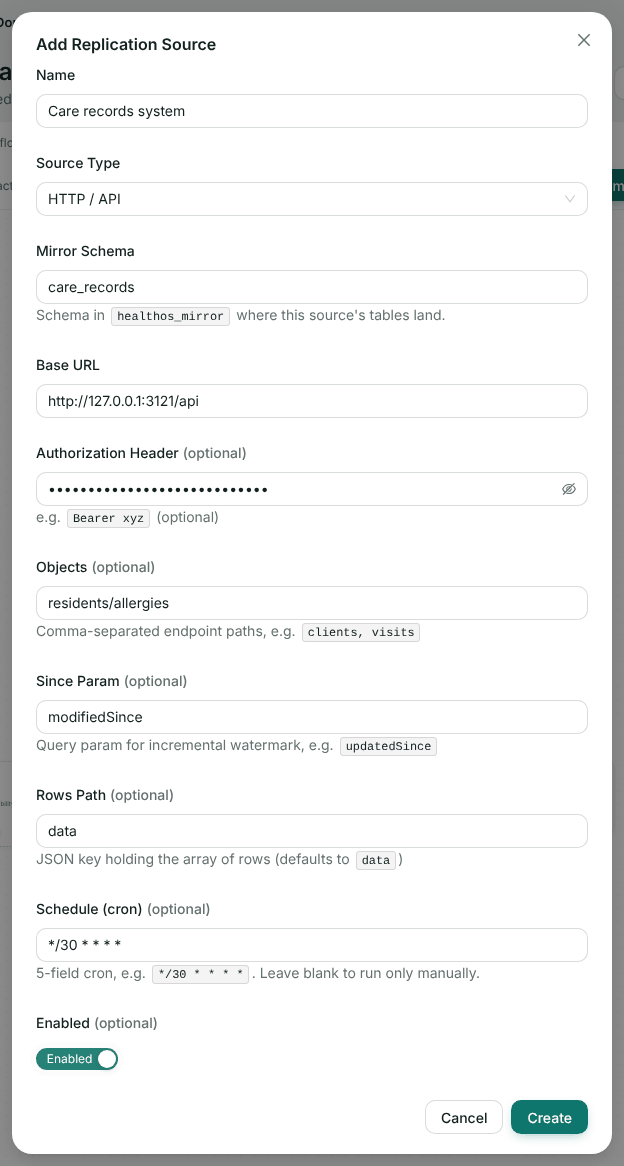
Our mock’s API. The credential is stored encrypted and never shown again. -
Land the endpoint as a table
Provider administratorOpen the new source, click Edit configuration, then click Bronze on the ingress lane and Add table. Enter the endpoint path as Source table, a Mirror table name, and the CDM entity it becomes. Click Add, then Review & publish and Publish.
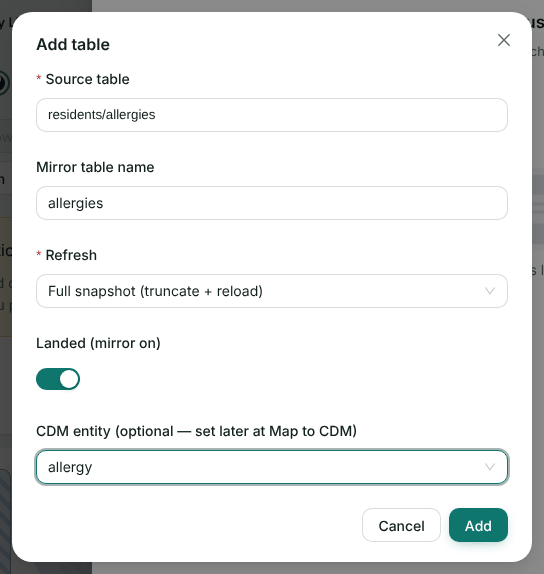
Full snapshot reads everything each time. For large endpoints, an incremental refresh with a watermark column sends your Since Param with the last value seen. -
Answer HealthOS’s request
YouOn each run, HealthOS made one GET per object, with your header:
GET /api/residents/allergies?limit=50000
Authorization: Bearer {your API token}
Our mock answered with the rows under
data:{ "data": [ { "residentId": "R-7781", "mrn": "CHL-DEMO-002", "givenName": "Margaret", "familyName": "Chen", "dateOfBirth": "1942-09-03", "allergy": "Ibuprofen", "reaction": "Wheeze", "severity": "moderate", "updatedAt": "2026-10-17T08:30:00Z" }, { "residentId": "R-7782", "mrn": "CHL-DEMO-001", "givenName": "Bryan", "familyName": "Baldwin", "dateOfBirth": "1938-04-12", "allergy": "Sulfonamides", "reaction": "Hives", "severity": "mild", "updatedAt": "2026-10-17T08:40:00Z" } ], "page": 1, "nextPage": null }HealthOS reads one response per object, so return everything that changed in one answer, or keep the result small with your changed-since filter. Keep column names stable between runs, and give each row an id that doesn’t change when the row does.
-
Map the table to the record
Provider administratorClick Gold on the ingress lane. The table is listed under its CDM entity as needs mapping. Click Map, name the template, and add a row for each field with Add mapping. Tick Match on for the fields that identify a record, so a re-read updates it instead of adding another.
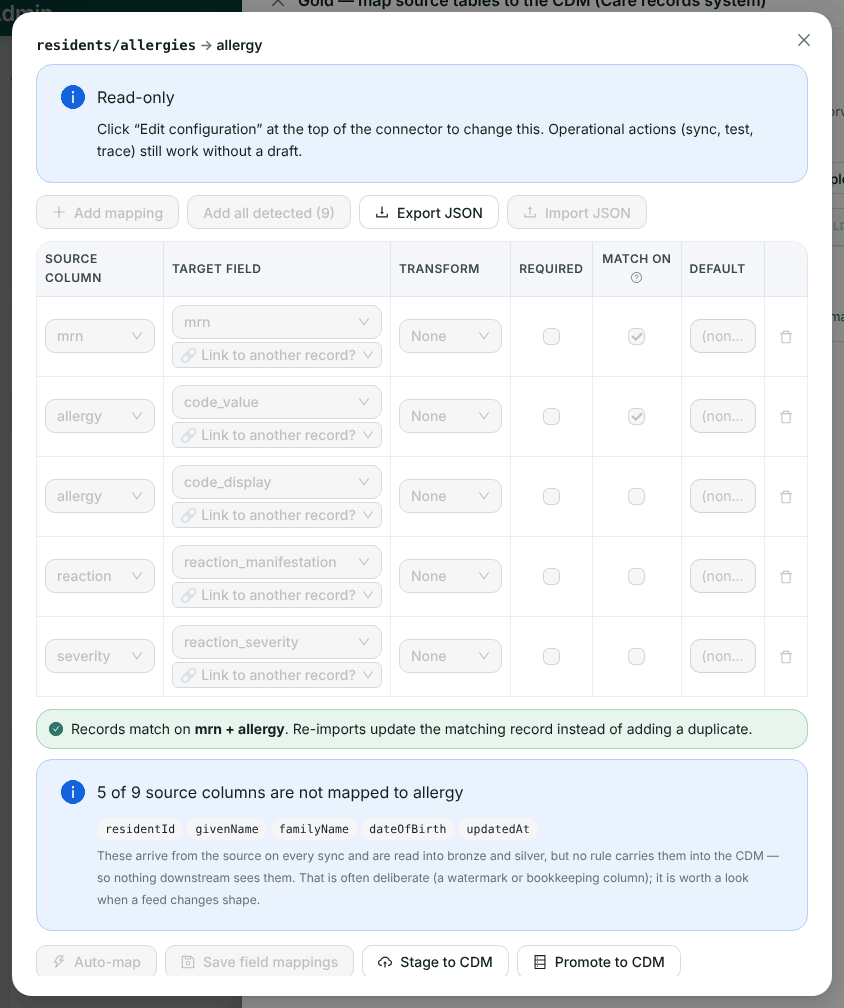
Records match on mrn + allergy. The target list offers the entity’s own fields, so we added the mrnrow, which matches the person, through the integrations API. The other rows were added here. -
Run it and promote
Provider administratorClick Run mirror sync now on the source, or wait for its schedule. Then, in the mapping, click Stage to CDM and Promote to CDM. The provider can set promotion to run on a schedule instead, under No match → create.
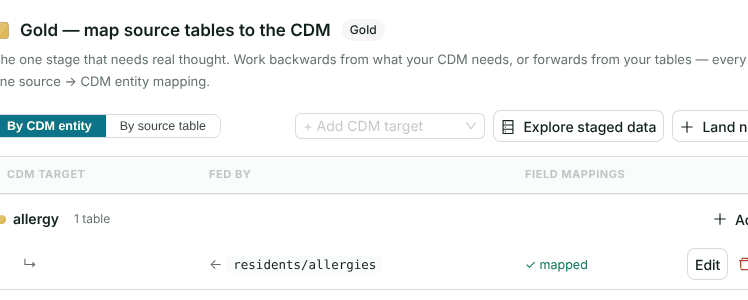
Your FHIR server
-
Install a FHIR connection with your credentials
Provider administratorIn Interoperability → Marketplace, install FHIR R4 endpoint. Enter your FHIR base URL, set Authentication to OAuth2 / SMART (client credentials) and fill in the Token URL, Client ID, Client secret and Scope. List the Resource types to read. API key, bearer token and basic authentication are on the same form.
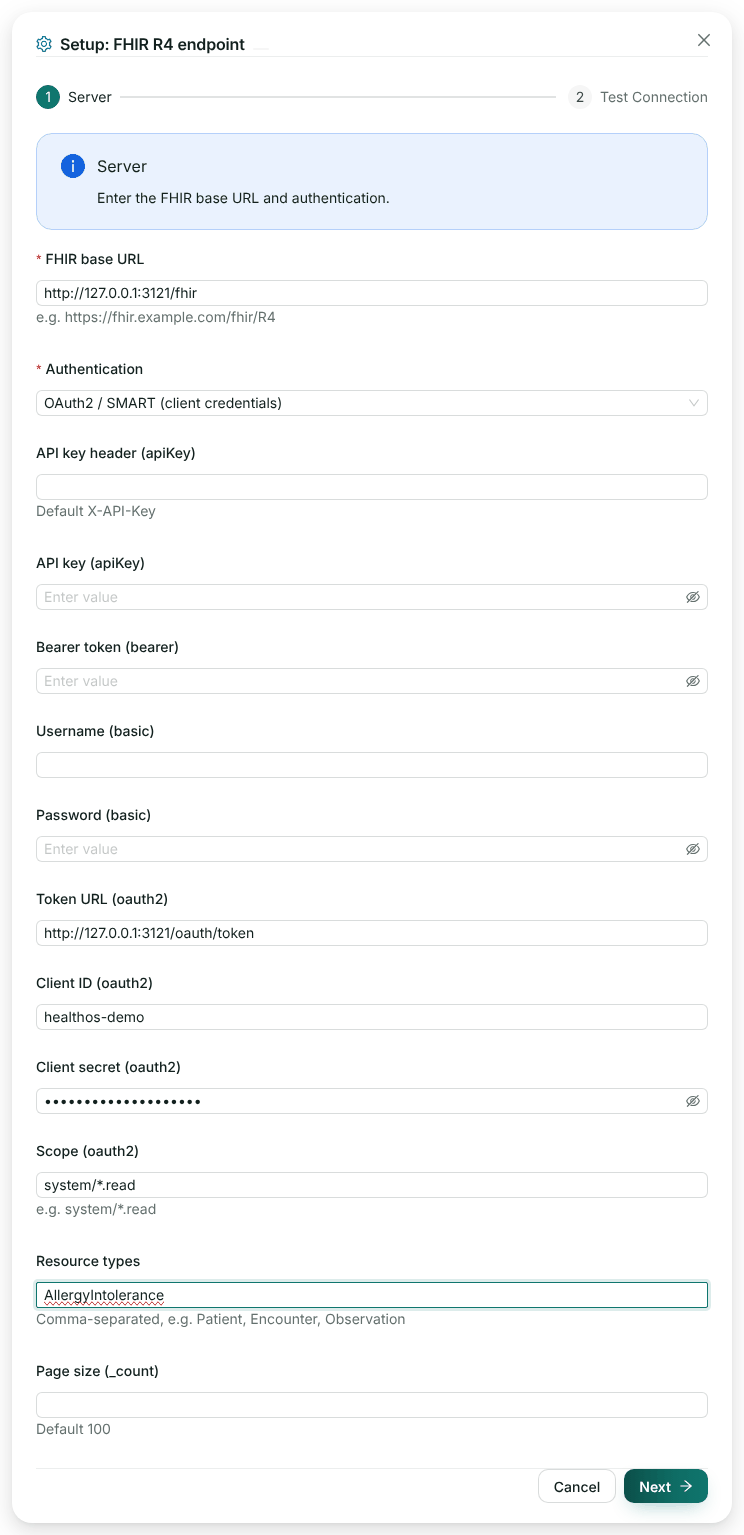
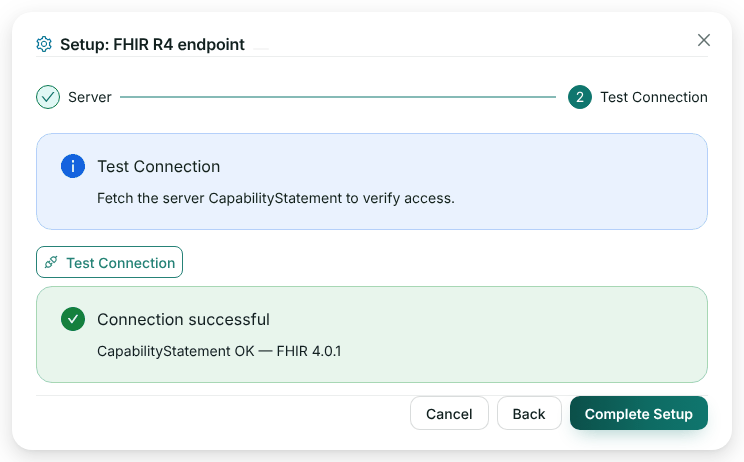
Click Next and Test Connection. HealthOS fetches a token, then your CapabilityStatement:
-
Answer the token request and the search
YouWhat HealthOS sent to our mock on each run:
POST /oauth/token
Content-Type: application/x-www-form-urlencoded

grant_type=client_credentials&client_id=healthos-demo&client_secret={secret}&scope=system/*.read

GET /fhir/AllergyIntolerance?_count=100
Authorization: Bearer {access_token}
Answer the search with a
searchsetBundle. HealthOS follows the Bundle’snextlink, so page as you normally would. Put the person’s identifier in each resource, for example inpatient.identifier, because that is what the provider matches on. -
Create a scheduled channel
Provider administratorCreate the ingress channel, its promotion template and auto-promotion exactly as in steps 2 to 5 of the FHIR walkthrough, then publish. One difference: the connection hands the channel each resource flattened into dotted keys, such as
code.coding.0.code, so the promotion template maps those keys directly and the channel needs no Field mapping step. In Integration Flows, edit the channel, keep Trigger on Schedule, switch Enabled on and save.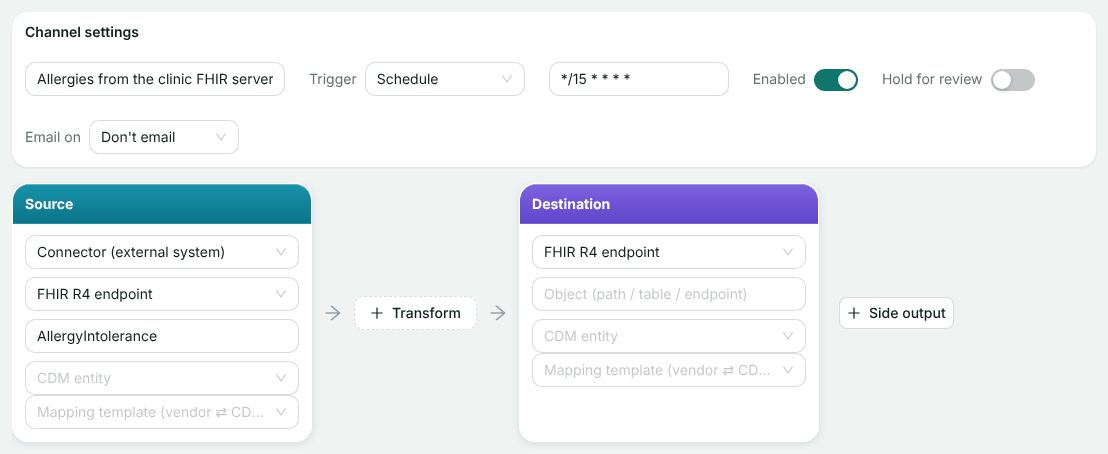
Every 15 minutes, HealthOS searches AllergyIntolerance and stages what comes back. Run now on the flows list runs it straight away.
An extract file
-
Upload the extract
Provider administratorFor a one-off load, or a system that only produces extracts, install CSV / Flat File Import from the marketplace and open it in Integration Topology. Click Upload file on the ingress lane and choose the file. HealthOS previews the columns and suggests person fields. Click Ingest.
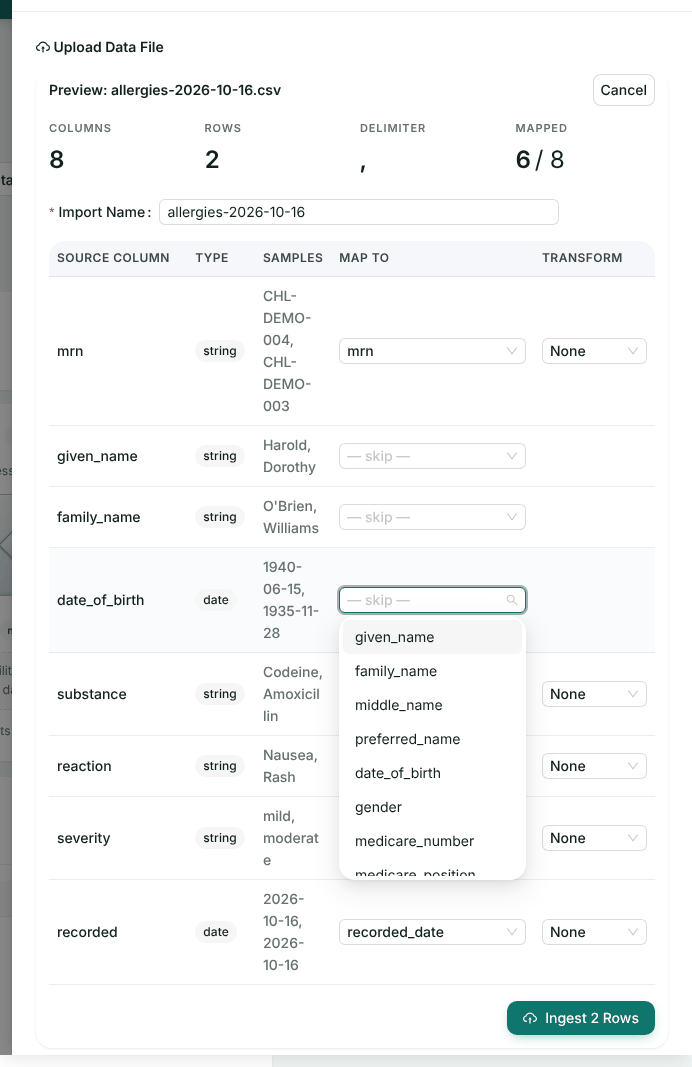
The upload maps the person fields. The rest of each row is kept, and the connection’s promotion template maps it to the allergy. As in the FHIR walkthrough, we added that template, with the allergyentity and auto-promotion, through the integrations API.Our extract:
mrn,given_name,family_name,date_of_birth,substance,reaction,severity,recorded
CHL-DEMO-004,Harold,O'Brien,1940-06-15,Codeine,Nausea,mild,2026-10-16
CHL-DEMO-003,Dorothy,Williams,1935-11-28,Amoxicillin,Rash,moderate,2026-10-16
Both rows matched on MRN and were promoted by the connection’s template on its schedule. Send a header row, keep column names stable, and include the identifiers you hold. CSV with comma, tab, pipe or semicolon, and Excel, are read, up to 50 MB.
The marketplace also has an SFTP Import connector for a file your system drops on a schedule. We didn’t run an SFTP server for this walkthrough, so we haven’t shown it.
Your database
-
Add your database as a replication source
Provider administratorWhere the data sits in a database you run, the provider adds it the same way as the REST API above, with Source Type set to PostgreSQL, MySQL / MariaDB, SQL Server or Oracle, and the host, database and account you give them. Tables are then landed, typed and mapped in the same bronze, silver and gold steps, on the schedule set here.
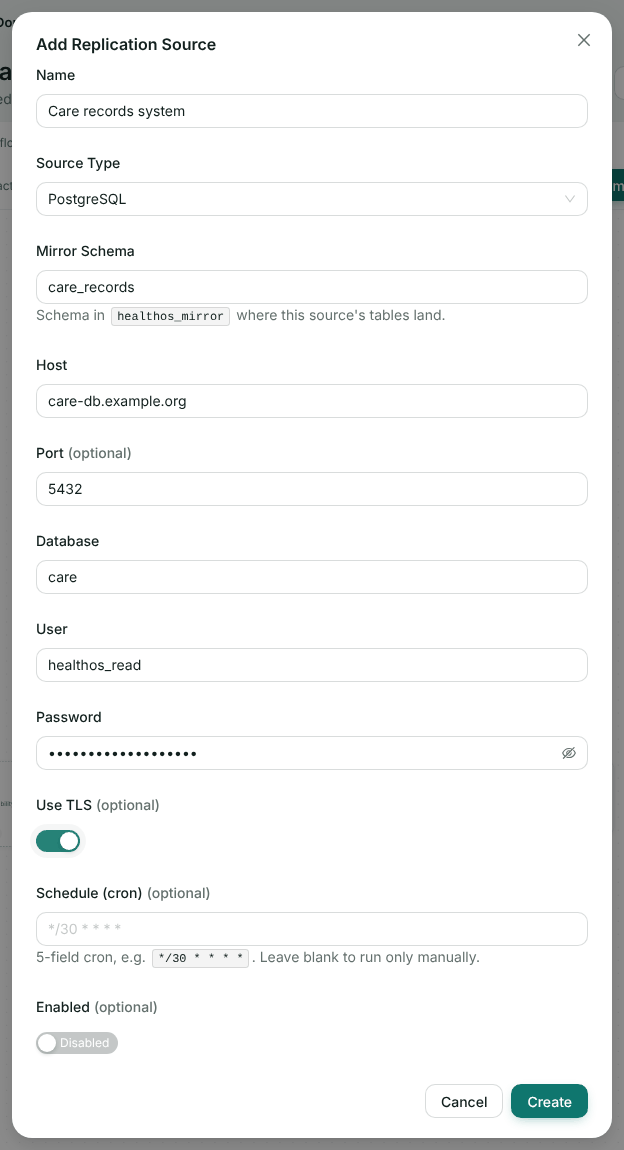
The form for a PostgreSQL source. We didn’t connect it to a real database. The REST source above runs through the same pipeline. Give HealthOS a read-only account limited to the tables in scope, and use TLS. For incremental runs, a last-modified column or a rising key on each table keeps every run small.
Check it worked
- Your logs show HealthOS’s requests on the schedule the provider set, with the credential you issued.
- The REST source’s sync history shows rows synced, and the gold mapping shows mapped.
- The FHIR channel’s History shows a scheduled run with records in and out.
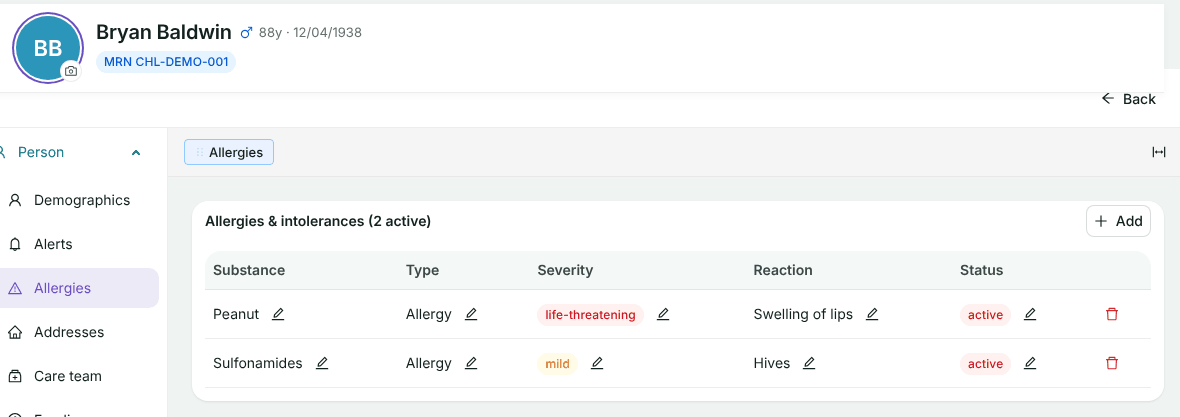
- The records are on the residents. Bryan Baldwin’s allergies, one from each pull:
If something goes wrong
| What you see | Why | What to do |
|---|---|---|
| A sync succeeds with 0 rows | No table is landed yet. The Objects on the source only say what exists | Add the table under Bronze and publish |
| Rows are mirrored but nothing reaches the record | The gold mapping isn’t there, or nothing has been staged and promoted yet | Map it, then stage and promote, or turn on auto-promotion |
| Staged FHIR records are unmatched and nearly empty | The channel has a Field mapping step written for nested paths. The connection already flattens resources, so the paths find nothing | Remove the step and map the dotted keys in the promotion template |
| Test Connection fails | The token endpoint refused the client, or the FHIR base URL is wrong | Check the client id, secret and scope with the vendor |
| A record matched no one | The identifier isn’t one the provider holds for that person | Send the provider’s MRN, or an IHI or Medicare number |
| The same allergy appears twice after a re-read | No match-on fields in the mapping | Tick Match on for the person and the code |
Related
Tell us what your system exposes
An API reference or a sample extract is enough to start. We’ll tell you which route will be least work.