
Launch a SMART app from the chart
By the end, a clinician opens a person’s record in HealthOS, clicks Apps, picks yours, allows it once, and your app shows that person and their latest results. Allow an afternoon, most of it on your side. The provider’s HealthOS administrator registers the app and decides who sees it.
You will need
- A web app with a server side. Ours is one Node.js file with no dependencies.
- Two https addresses on it: a launch URL HealthOS opens, and a redirect URI it sends the clinician back to.
- The provider’s HealthOS address, a test organisation, and a clinician login there.
Before you start
This is the SMART on FHIR “EHR launch”. HealthOS starts it: it opens your launch URL with iss (the FHIR base URL) and a one-off launch id. Your app sends the browser to HealthOS to authorise, with PKCE, and exchanges the code it gets back for a token that is bound to that person (and the encounter, when launched from one).
Do the token exchange and the FHIR calls from your server, as our sample does. HealthOS does not send CORS headers to an app’s own origin, so a browser-only app cannot call /smart/token or /fhir from JavaScript.
The steps below were run against a local HealthOS with demo data. Hosts are shown as https://healthos.example.org for HealthOS and https://app.example.com for the app. In the screenshots the app ran on localhost:3290.
Build the app
-
Handle the launch
YouYour launch URL receives
?iss=https://healthos.example.org/fhir&launch=…. Read the SMART configuration from the server root, make a PKCE verifier and challenge, remember them against a randomstate, and redirect to the authorisation endpoint.audmust be theissyou were given, and the scope must includelaunch.import { createHash, createPublicKey, randomBytes, verify } from 'node:crypto'; const CLIENT_ID = process.env.CLIENT_ID; // from HealthOS Admin const REDIRECT_URI = 'https://app.example.com/callback'; const pending = new Map(); // state -> what the callback needs const b64url = (buf) => Buffer.from(buf).toString('base64url'); async function discover(iss) { // HealthOS publishes SMART discovery at the server root. const res = await fetch(new URL('/.well-known/smart-configuration', iss)); if (!res.ok) throw new Error(`discovery failed: ${res.status}`); return res.json(); } // GET /launch?iss=…&launch=… async function authorize(res, iss, scope, launch) { const config = await discover(iss); const verifier = b64url(randomBytes(32)); const challenge = b64url(createHash('sha256').update(verifier).digest()); const state = b64url(randomBytes(16)); const nonce = b64url(randomBytes(16)); pending.set(state, { iss, verifier, nonce, config }); const url = new URL(config.authorization_endpoint); url.search = new URLSearchParams({ response_type: 'code', client_id: CLIENT_ID, redirect_uri: REDIRECT_URI, scope, // 'launch openid fhirUser patient/*.rs' state, nonce, aud: iss, code_challenge: challenge, code_challenge_method: 'S256', ...(launch ? { launch } : {}), }).toString(); res.writeHead(302, { Location: url.toString() }).end(); } -
Exchange the code
YouHealthOS sends the clinician back to your redirect URI with
codeandstate. Look up the state, then post the code with the PKCE verifier. A public client sends itsclient_idand no secret.// GET /callback?code=…&state=… async function callback(res, params) { if (params.get('error')) return page(res, `Authorisation refused: ${params.get('error')}`); const entry = pending.get(params.get('state')); if (!entry) return page(res, 'Unknown or expired state.', 400); pending.delete(params.get('state')); const tokenRes = await fetch(entry.config.token_endpoint, { method: 'POST', headers: { 'Content-Type': 'application/x-www-form-urlencoded' }, body: new URLSearchParams({ grant_type: 'authorization_code', code: params.get('code'), redirect_uri: REDIRECT_URI, client_id: CLIENT_ID, code_verifier: entry.verifier, }), }); const token = await tokenRes.json(); if (!tokenRes.ok) return page(res, JSON.stringify(token), 400); const { claims } = await verifyIdToken(token.id_token, entry.config, entry); // token.patient is the person the chart was open on … }The response we got (tokens shortened):
{
  "access_token": "eyJhbGciOiJIUzI1NiIsInR5cCI6IkpXVCJ9…",
  "token_type": "Bearer",
  "expires_in": 3600,
  "scope": "launch openid fhirUser patient/*.rs",
  "refresh_token": "eyJhbGciOiJIUzI1NiIsInR5cCI6IkpXVCJ9…",
  "id_token": "eyJhbGciOiJSUzI1NiIsImtpZCI6ImJZdEZtcnhtT1B6cGJfOUFLbGV1SjNxOS16V2N5UmdncTI5LWs0Y3o5WjgiLCJ0eXAiOiJKV1QifQ…",
  "patient": "0d72ded0-776a-445d-8476-ad0c9fdbb494"
}
Launched from an encounter, the response also carries
encounter. The access token lasts an hour and the refresh token 24 hours. -
Verify the id_token
YouBecause you asked for
openid fhirUser, the response includes an OpenID Connect id_token, signed RS256. Check it before you trust who signed in: the signature against the key named bykidin the JWKS that discovery lists (/smart/jwks.json), theniss,aud,expand thenonceyou sent.async function verifyIdToken(idToken, config, expected) { const [h, p, s] = idToken.split('.'); const header = JSON.parse(Buffer.from(h, 'base64url')); const claims = JSON.parse(Buffer.from(p, 'base64url')); const jwks = await (await fetch(config.jwks_uri)).json(); const jwk = jwks.keys.find((k) => k.kid === header.kid); if (header.alg !== 'RS256' || !jwk) throw new Error('id_token: unknown key'); const key = createPublicKey({ key: jwk, format: 'jwk' }); const ok = verify('sha256', Buffer.from(`${h}.${p}`), key, Buffer.from(s, 'base64url')); if (!ok) throw new Error('id_token: bad signature'); if (claims.iss !== expected.iss) throw new Error('id_token: wrong iss'); if (claims.aud !== CLIENT_ID) throw new Error('id_token: wrong aud'); if (claims.exp * 1000 < Date.now()) throw new Error('id_token: expired'); if (claims.nonce !== expected.nonce) throw new Error('id_token: wrong nonce'); return { header, claims }; }The claims from our run.
fhirUsernames the clinician as a Practitioner, andsubis their stable HealthOS user id:{ "iss": "https://healthos.example.org/fhir", "sub": "b71616e4-deb3-4e9d-82b7-8cf1c5d715dd", "aud": "smart-e9f7031f30a11ba5fe05f170", "fhirUser": "https://healthos.example.org/fhir/Practitioner/b71616e4-deb3-4e9d-82b7-8cf1c5d715dd", "nonce": "z0F3bqlDD_4_Cc3jv0W-9A", "auth_time": 1792286317, "iat": 1792286327, "exp": 1792289927 } -
Read the patient and their results
YouCall the FHIR API at
isswith the access token. Apatient/scope only reaches the person intoken.patient.GET /fhir/Patient/0d72ded0-776a-445d-8476-ad0c9fdbb494 GET /fhir/Observation?patient=0d72ded0-776a-445d-8476-ad0c9fdbb494&_sort=-date&_count=5 Authorization: Bearer {access_token} Accept: application/fhir+jsonThen render them however your app does. Ours prints the name, date of birth and a table of the five most recent observations.
Register it and open it
-
Register the app
Provider administratorIn HealthOS Admin, go to Interoperability → FHIR / SMART on FHIR, check Viewing shows the right organisation, and click Register SMART Client. Fill in:
- Display name: the name clinicians see in the Apps menu.
- Description: one line, shown under the name in the menu.
- Client type: Public (no secret, PKCE only). An app with a server that can keep a secret may use Confidential – client secret instead.
- Redirect URIs: your callback, exactly as your app sends it.
- Allowed scopes:
launch openid fhirUser patient/*.rs, or narrower types if the app needs less. - Launch mode: EHR-launch only.
- Who signs in: Clinicians and staff (HealthOS sign-in).
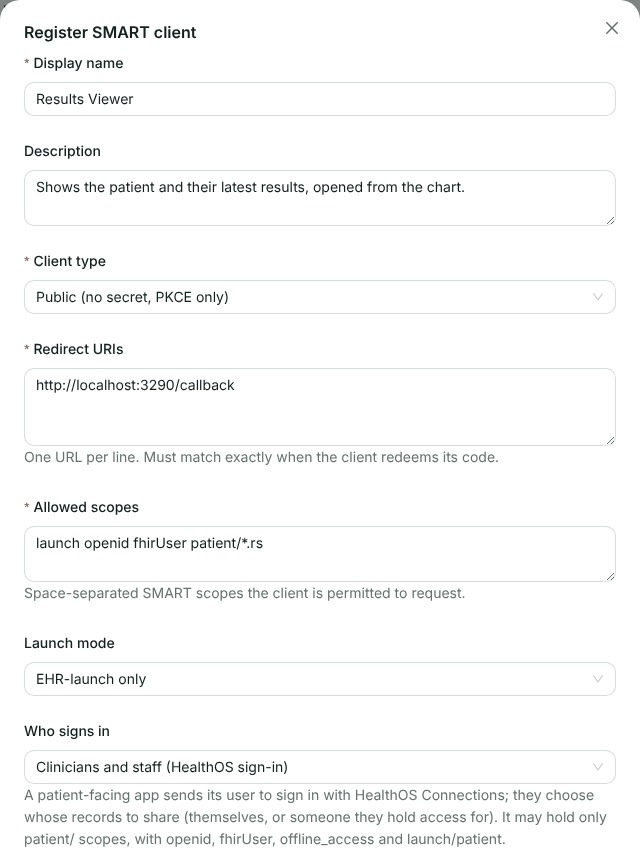
The top half of the form. -
Put it in the chart
Provider administratorLower down, under In the clinician app:
- Launch URL: your app’s launch handler. HealthOS adds
?iss=…&launch=…to it. Without it the app is not offered in the chart. - Show in: tick Person’s chart header to launch with the person, and Encounter view to launch with the person and the open encounter.
- Only for roles: role codes such as
doctorandregistered_nurse. Leave it empty to offer the app to every role that may launch apps. - Logo URL: a square https image. At the time of writing the clinician app only loads images from its own host, so a logo on your host shows as the first letter of the app’s name instead (you can see this in step 3).
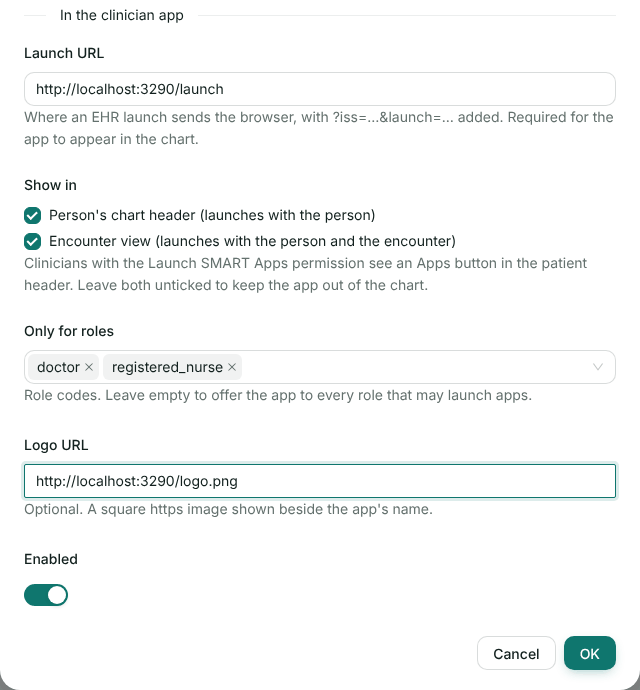
Offered in the chart header and the encounter view, to doctors and registered nurses. Click OK. The row shows where the app appears and how many roles see it. Send the vendor the Client ID.
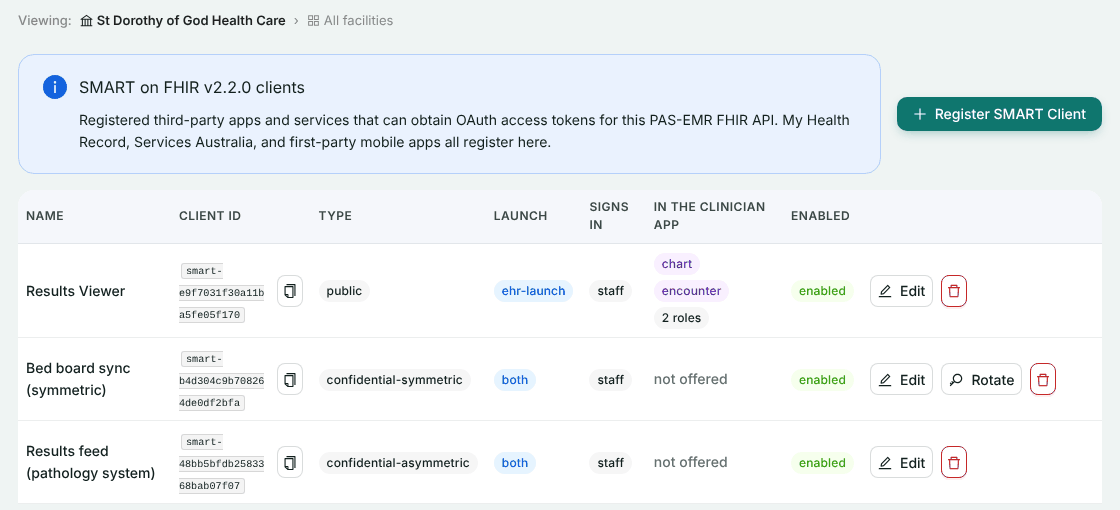
Results Viewer, registered alongside two backend systems. Clinicians also need the Launch SMART Apps permission. The clinical system roles hold it already. If someone cannot see the Apps button, check their role under Organisation → Users & Roles.
- Launch URL: your app’s launch handler. HealthOS adds
-
Open the app from a person’s chart
ClinicianIn HealthOS, open the person and click Apps in the patient header. Pick the app.

The Apps menu lists only the apps offered here and to this clinician’s role. The app opens in a new tab. HealthOS hands the clinician’s sign-in to the authorisation page, so they are not asked to sign in again.
-
Allow access
ClinicianThe authorisation page lists the scopes the app asked for and the person it was launched for. Allow sends the browser back to your app with a code. Deny sends it back with
error=access_denied.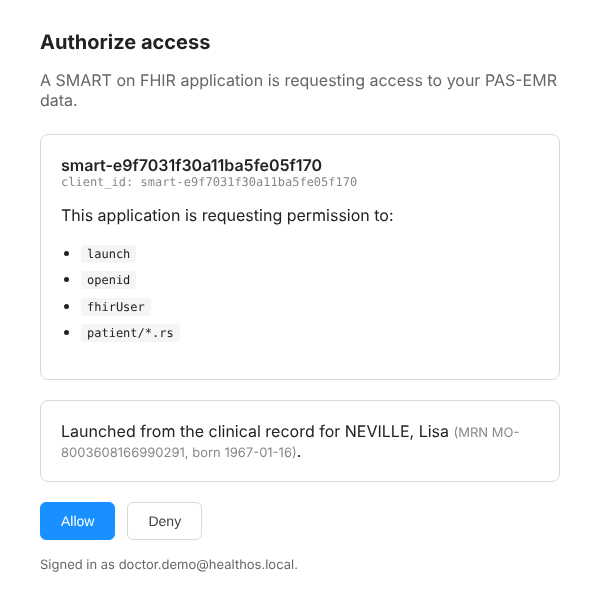
The page names the app by its client ID, not its display name. Tell the provider’s clinicians which ID is yours. -
Your app shows the patient
YouThe callback exchanges the code, verifies the id_token, reads the patient and shows them.
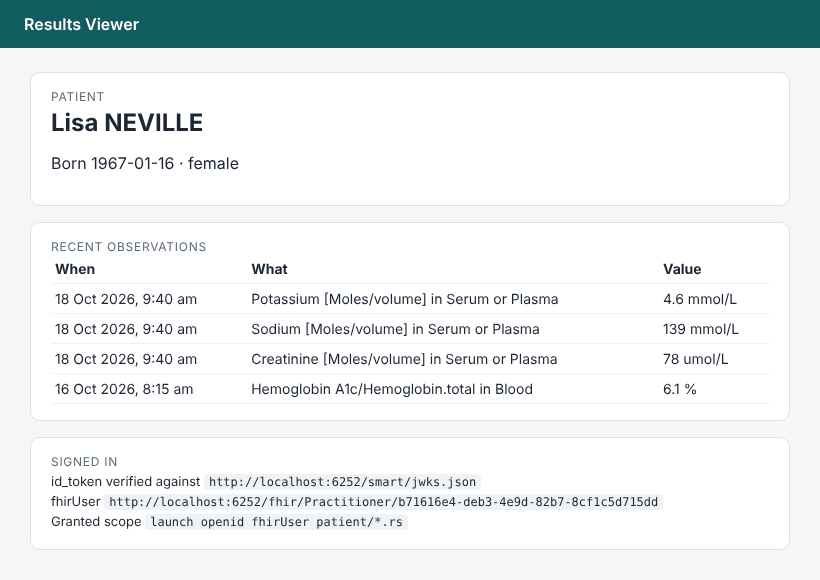
Our sample app, showing the person the chart was open on. The results are the ones written in the backend services walkthrough.
Check it worked
- The token response carries
patient, and it is the person whose chart the clinician had open. - The id_token verifies, and its
fhirUseris a Practitioner. - Sign in as a clinician whose role is not in Only for roles. The Apps menu does not list the app.
If something goes wrong
These are the answers we saw, or that the server is written to give.
| What you see | Why | What to do |
|---|---|---|
| No Apps button in the header | The clinician lacks the Launch SMART Apps permission, or no app is offered there | Check the role, the Show in boxes and Only for roles |
| A letter instead of your logo in the Apps menu | The clinician app’s content security policy only loads images from its own host, so it blocked the logo | Nothing on your side. The app still launches |
400 invalid_request, “launch is unknown, expired, or was not issued to this app and user” | A launch id lasts ten minutes and works once, for that app and that clinician | Start again from Apps. Don’t cache launch ids |
400 invalid_request, “aud must be this server’s FHIR base URL” | aud is not the iss you were launched with | Send iss back unchanged as aud |
400 invalid_request, “An EHR launch must request the launch scope” | You sent launch without the launch scope | Add launch to the scope |
400 invalid_request, “redirect_uri is not registered for this client” | The redirect URI differs from the registration, even by a trailing slash | Make them match exactly |
400 invalid_scope, “Requested scope exceeds what this client is authorised for” | You asked for more than Allowed scopes | Ask for less, or ask the administrator to widen it |
401 OperationOutcome from {iss}/.well-known/smart-configuration | HealthOS serves discovery at the server root, not under /fhir | Read /.well-known/smart-configuration on the same host |
The browser call to /smart/token fails with a CORS error | HealthOS does not answer cross-origin calls from your app’s origin | Exchange the code from your server |
Related
Ready to try it in a test organisation?
Send us your launch URL and redirect URI. We’ll register the app with you and open it from a demo chart together.