
Connect a patient or family app
By the end, someone opens your app, signs in with their HealthOS Connections account, chooses whose records to share from the people they may act for, and your app shows that person. Allow an afternoon. The provider’s HealthOS administrator registers the app. The person signing in needs a Connections account that the provider has already linked to the people they look after.
You will need
- A web or mobile app with a server side, and an https redirect URI on it.
- The provider’s HealthOS address, and their HealthOS Connections address set on their HealthOS server (see below).
- A test HealthOS Connections login with an active link to at least one person in the test organisation.
Before you start
This is a SMART on FHIR “standalone launch”. Your app starts it, not HealthOS. The person signing in is a patient, or a family member or representative who uses HealthOS Connections, the provider’s portal. HealthOS sends them to Connections to sign in, then shows them only the people they may act for: themselves, if they are a patient, and anyone they hold an active link for.
The app’s token is bound to the one person they chose, and can only carry patient/ scopes, plus openid, fhirUser, offline_access, online_access and launch/patient. A patient-facing app is never offered in the clinician chart, and an EHR launch is refused.
The provider’s HealthOS server needs to know where Connections lives. Whoever runs it sets PATIENT_PORTAL_URL on the API to the public Connections address (the same setting the admission estimate links use). Without it, the authorisation page answers 503, “Patient sign-in is not configured on this server”.
Like the clinician app, do the token exchange and FHIR calls from your server. HealthOS does not answer cross-origin calls from your app’s origin. The steps below were run against a local HealthOS with the aged care demo: Kate Halloran, who holds enduring power of attorney for her mother Joan, a resident. Hosts are shown as https://healthos.example.org and https://family.example.com.
Set it up
-
Register the app for patients and families
Provider administratorIn HealthOS Admin, go to Interoperability → FHIR / SMART on FHIR, check Viewing shows the right organisation, and click Register SMART Client. Fill in:
- Display name and Description.
- Client type: Public (no secret, PKCE only) for a mobile or single-page app.
- Redirect URIs: your callback, exactly as your app sends it.
- Launch mode: Standalone-launch only.
- Who signs in: Patients and families (HealthOS Connections sign-in). The form swaps in patient scopes when you pick it.
- Allowed scopes:
launch/patient openid fhirUser offline_access patient/*.rs, or narrower resource types. - Leave everything under In the clinician app empty, and untick Show in.
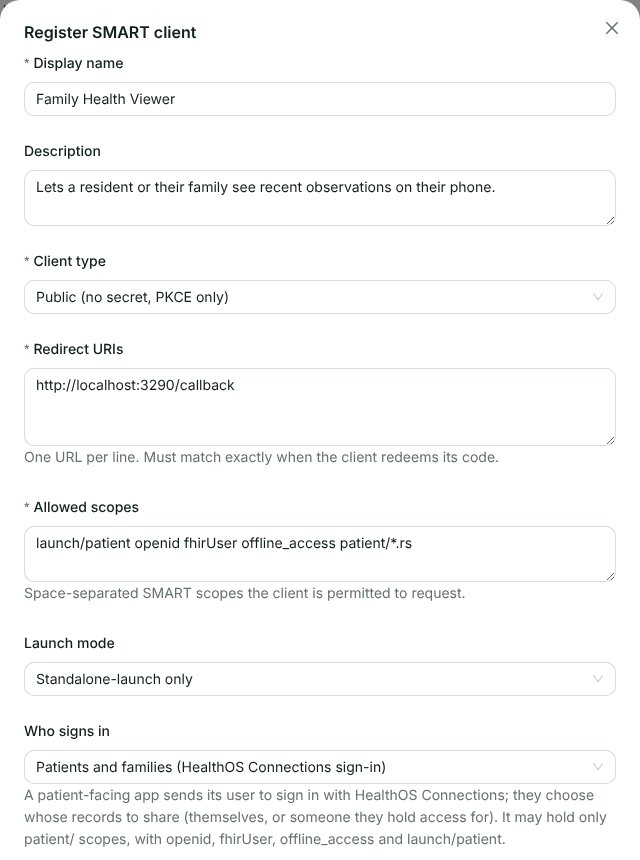
A patient-facing registration. The form refuses a scope a patient or family member cannot grant:
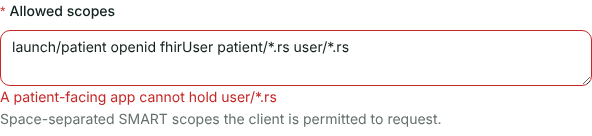
A user/scope on a patient-facing app.Click OK and send the vendor the Client ID. The row shows patient under Signs in.
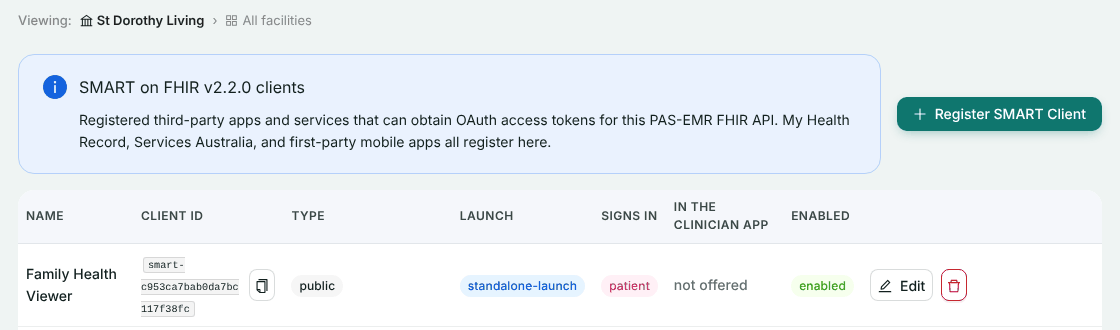
Registered. The second row is a device gateway we used to give the demo resident some observations. -
Check who can sign in
ProviderThe person needs an active HealthOS Connections account, and for anyone other than themselves, an active link to that person in this organisation. Family access that the care team has already granted in Connections is what counts. Nothing extra is set up for the app.
The sign-in page takes an email and password. Someone who usually signs in to Connections with an emailed link should open that link in the same browser first. The sign-in page then sees they are already signed in and goes straight on.
-
Start the launch from your app
YouSend the browser to the authorisation endpoint with no
launchparameter and thelaunch/patientscope. It is the same request as the clinician app’s, with a different scope:// GET /start: the person taps "Connect to HealthOS" in your app const HEALTHOS = 'https://healthos.example.org'; const STANDALONE_SCOPE = 'launch/patient openid fhirUser offline_access patient/*.rs'; // authorize() reads /.well-known/smart-configuration, makes the PKCE // verifier, state and nonce, and redirects (see the clinician walkthrough) return authorize(res, `${HEALTHOS}/fhir`, STANDALONE_SCOPE);GET /smart/authorize?response_type=code &client_id=smart-c953ca7bab0da7bc117f38fc &redirect_uri=https://family.example.com/callback &scope=launch/patient openid fhirUser offline_access patient/*.rs &state=tDeNnY-gr_QmiwXAETQ7zA &nonce=X7fdNWqdfKMWE_7d0IPeSw &aud=https://healthos.example.org/fhir &code_challenge=X-N5DJcoXGu4yS3hCVuGvnLx8dcQZo6F8r68UsJ2Hgk &code_challenge_method=S256Nobody is signed in yet, so HealthOS redirects to the provider’s Connections at
/smart/sign-in, carrying the authorisation request and a signature that only HealthOS can make. -
Sign in with HealthOS Connections
Patient or family memberThe page says what is happening: an app is asking to see records, and nothing is shared until they allow it.
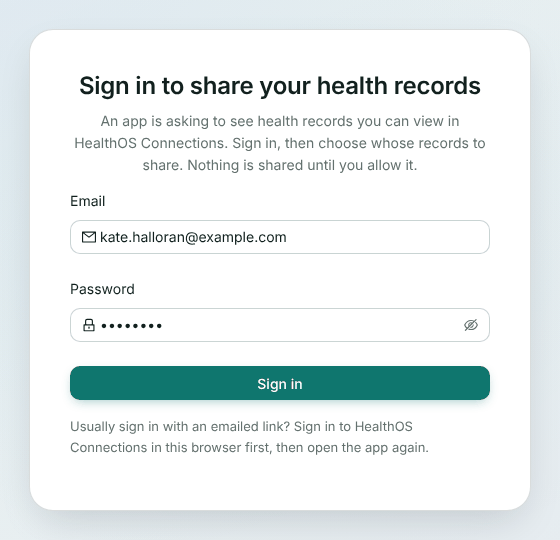
The Connections sign-in page, on the provider’s Connections address. Once they are signed in, Connections hands the sign-in back to HealthOS with a one-time token that lasts a minute, and the browser returns to the authorisation page.
-
Choose whose records to share
Patient or family memberThe authorisation page lists the scopes and, under Whose records may this application see?, only the people this login may act for in the app’s organisation. They choose one and click Allow.
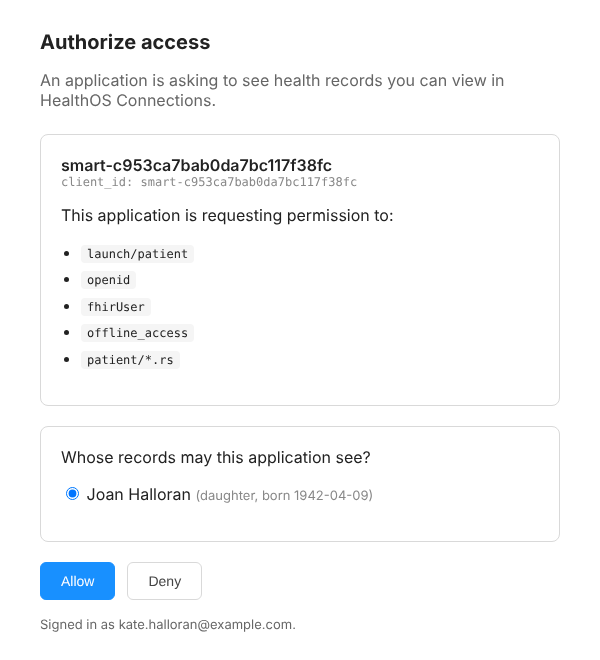
Kate may act for one person, her mother Joan. The note in brackets is Kate’s relationship to Joan (daughter), not Joan’s. Like the clinician page, it names the app by its client ID. Someone with nobody to share in this organisation is sent straight back to your redirect URI with
error=access_denied. -
Exchange the code and read who signed in
YouExchange the code exactly as in the clinician walkthrough. The response names the chosen person in
patient:{ "access_token": "eyJhbGciOiJIUzI1NiIsInR5cCI6IkpXVCJ9…", "token_type": "Bearer", "expires_in": 3600, "scope": "launch/patient openid fhirUser offline_access patient/*.rs", "refresh_token": "eyJhbGciOiJIUzI1NiIsInR5cCI6IkpXVCJ9…", "id_token": "eyJhbGciOiJSUzI1NiIsImtpZCI6…", "patient": "ace2e000-0000-4000-8000-000000000001" }Verify the id_token the same way. Its
subis the Connections account, andfhirUseris the person who signed in. For Kate it is a RelatedPerson, because her authority over Joan is recorded against her contact record on Joan’s file:{ "iss": "https://healthos.example.org/fhir", "sub": "portal:ace2e000-0000-4000-8000-000000000042", "aud": "smart-c953ca7bab0da7bc117f38fc", "fhirUser": "https://healthos.example.org/fhir/RelatedPerson/ace2e000-0000-4000-8000-000000000002", "nonce": "owf4O_CXLbAvu1-BcVqdmA", "auth_time": 1792286474, "iat": 1792286479, "exp": 1792290079 }A patient signing in for themselves gets
Patient/{id}. When HealthOS cannot tie the login to a FHIR resource, for example a family member whose authority is not linked to a contact record, the id_token has nofhirUserat all. In our first run Kate’s had none, until her authority was linked. Don’t make your app depend on it. Usesubto recognise a returning user andpatientfor whose records you hold. -
Show the person
YouRead the Patient and their Observations with the access token, as before. The token reaches only Joan’s records.
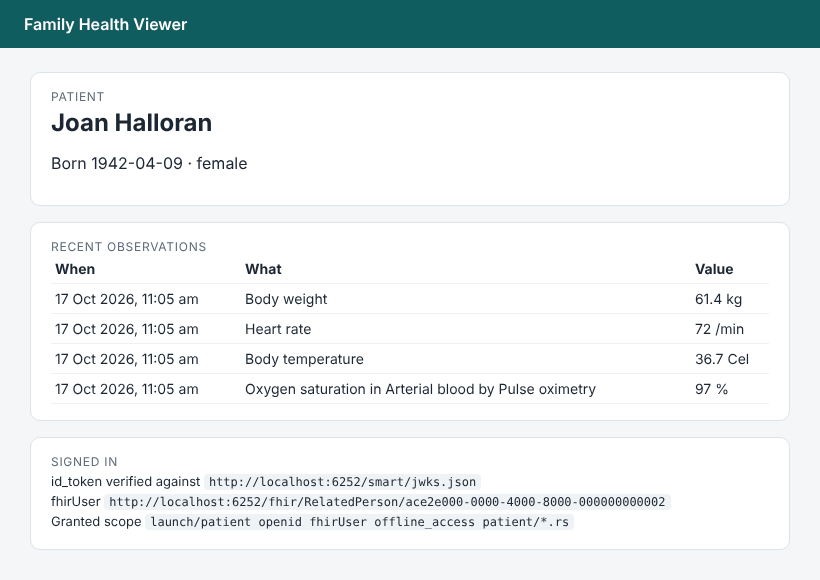
Our sample app after Kate allowed access, with the verified fhirUserfrom her id_token.
Check it worked
- The consent page lists only the people the test login may act for.
- The token response’s
patientis the person chosen, and a read of any other Patient id is refused. - The id_token verifies, and its
substarts withportal:. - Send a
user/scope in the request. The authorisation page refuses it before anyone signs in.
If something goes wrong
These are the answers we saw, or that the server is written to give.
| What you see | Why | What to do |
|---|---|---|
503 temporarily_unavailable, “Patient sign-in is not configured on this server” | PATIENT_PORTAL_URL is not set on the provider’s HealthOS API | Ask the provider to set it to their Connections address |
400 invalid_scope, “Requested scope exceeds what this client is authorised for” | You asked for a scope the registration does not hold, such as user/*.rs | Ask only for patient/ scopes and the identity scopes listed above |
400 invalid_request, “An EHR launch is made by a clinician, not a HealthOS Connections user” | You sent a launch parameter | A family app uses a standalone launch: no launch, and the launch/patient scope |
| “This sign-in link is not valid” on the Connections page | The link to /smart/sign-in was changed or cut short | Start again from your app. Don’t rewrite the authorisation redirect |
400 invalid_request, “The sign-in hand-off is invalid or expired” or “has already been used” | The one-time hand-off from Connections lasts a minute and works once | Start again from your app |
403 access_denied, “This HealthOS Connections login cannot authorise apps” | The account is inactive, locked, expired, or not a patient or family login | The provider checks the account in Connections |
Your callback gets error=access_denied with no consent page | The login has nobody it may act for in this organisation | The provider checks the person’s family access |
No fhirUser in the id_token | HealthOS could not tie the login to a Patient or RelatedPerson | Rely on sub and patient instead |
Related
Building for families?
Tell us who your app is for and what it reads. We’ll set up a test organisation with a demo family so you can try every step above.