
Connect a backend system to the FHIR API
By the end, your system holds its own signing key, gets a token with no user present, finds a patient by IHI, writes an Observation and runs a bulk export. Allow about an hour. The provider’s HealthOS administrator does one step, in HealthOS Admin. You do the rest from your own machine.
You will need
- Node.js 18 or later, or any language that can sign an RS384 JWT. The scripts here use nothing but Node’s own
cryptoandfetch. - An https address where your system can publish a small JSON file (its public key).
- The provider’s HealthOS address, and half an hour of their HealthOS administrator’s time.
- A test organisation to point at. Never start against live records.
Before you start
A backend service is a system with nobody signed in: a results feed, a data warehouse load, a bed board. It authenticates as itself, using SMART Backend Services, and every token it gets is limited to the one organisation that registered it and the system/ scopes the administrator allowed.
Agree the scopes with the provider before they register you. Ask for read (.rs) on each resource type you need and write (.cu, create and update) only on the ones you actually write. A bulk export carries only the types your scopes can read.
Everything below was run against a local HealthOS with demo data. Hosts are shown as https://healthos.example.org (the provider’s HealthOS) and https://results.example.com (your system). Tokens and keys are shortened.
Set it up
-
Make a key pair and publish the public half
YouYour system proves who it is by signing a short JWT with a private key that never leaves it. HealthOS checks the signature against the public key you publish as a JWKS (JSON Web Key Set). This script makes both:
// make-keys.mjs: generate an RSA key pair for SMART Backend Services.
// Writes private-key.pem (keep it secret) and jwks.json (publish it).
import { generateKeyPairSync, createHash } from 'node:crypto';
import { writeFileSync } from 'node:fs';

const { publicKey, privateKey } = generateKeyPairSync('rsa', { modulusLength: 2048 });

const jwk = publicKey.export({ format: 'jwk' });
// kid: the RFC 7638 thumbprint, so it changes whenever the key does.
const thumbprint = createHash('sha256')
  .update(JSON.stringify({ e: jwk.e, kty: jwk.kty, n: jwk.n }))
  .digest('base64url');

const jwks = { keys: [{ ...jwk, kid: thumbprint, alg: 'RS384', use: 'sig' }] };

writeFileSync('private-key.pem', privateKey.export({ format: 'pem', type: 'pkcs8' }), { mode: 0o600 });
writeFileSync('jwks.json', JSON.stringify(jwks, null, 2));
console.log(`kid ${thumbprint}`);
Run
node make-keys.mjs. Keepprivate-key.pemin your secret store. Publishjwks.jsonat a stable https address, for examplehttps://results.example.com/.well-known/jwks.json. It looks like this:{ "keys": [ { "kty": "RSA", "n": "qWIdflt-3etFU7q6VlpNzYv_…", "e": "AQAB", "kid": "uOQWsR0lGs81qXwFYdXjLxI2FMx98HRqXIUh-17nwGg", "alg": "RS384", "use": "sig" } ] }HealthOS fetches this URL itself, from its own servers, so it must be reachable from the internet. It caches the keys for ten minutes. When you rotate, publish the new key beside the old one first, wait ten minutes, then start signing with it.
-
Open the SMART client register
Provider administratorIn HealthOS Admin, go to Interoperability → FHIR / SMART on FHIR. This page lists every app and system registered for the organisation shown under Viewing. Check it names the right organisation: a registration belongs to one organisation, and its tokens see only that organisation’s records.
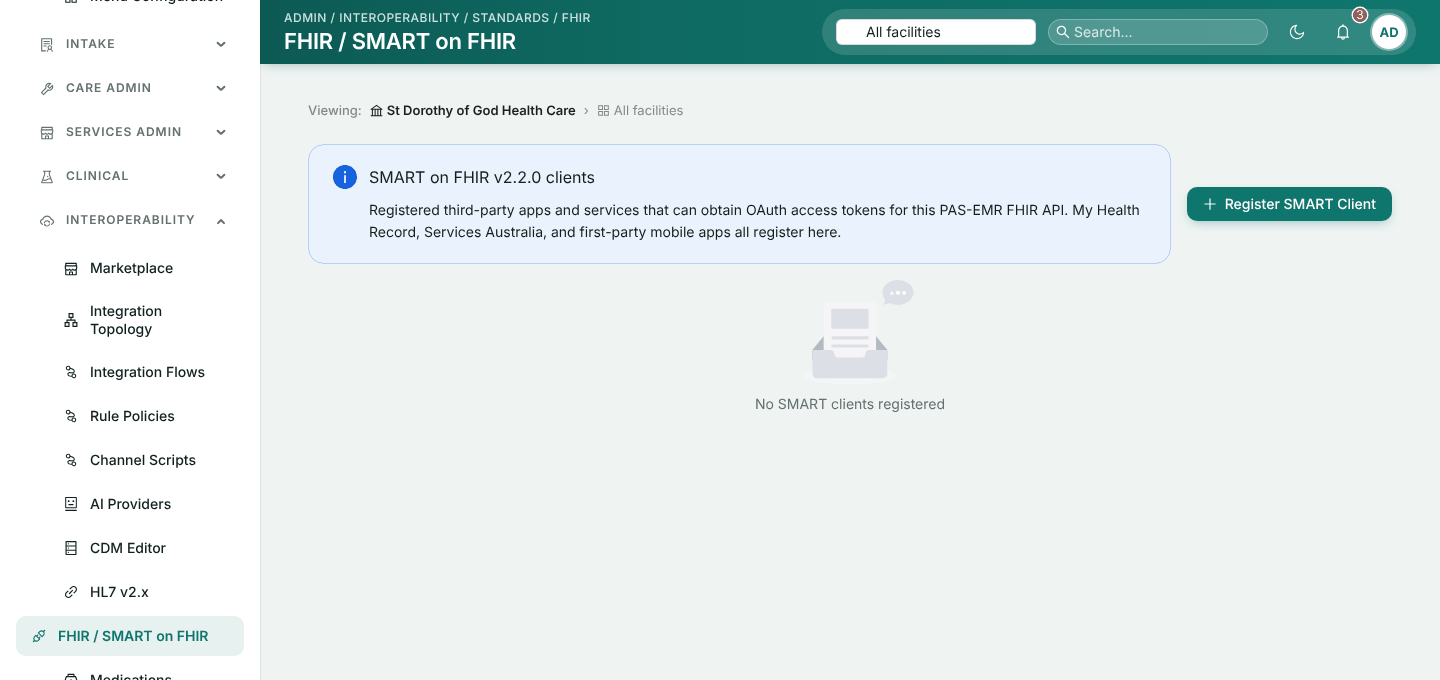
The FHIR / SMART on FHIR page, before anything is registered. -
Register the system
Provider administratorClick Register SMART Client and fill in:
- Display name: what the provider will recognise in audit and Provenance, for example “Results feed (pathology system)”.
- Client type: Confidential – JWKS / private_key_jwt.
- Redirect URIs: a backend service never uses one, but the form requires at least one. Enter your system’s https address.
- Allowed scopes: the
system/scopes you agreed, separated by spaces. - JWKS URI: the address where you published
jwks.json. - Leave Who signs in on clinicians and staff, and untick both boxes under Show in. A backend service has no place in the chart.
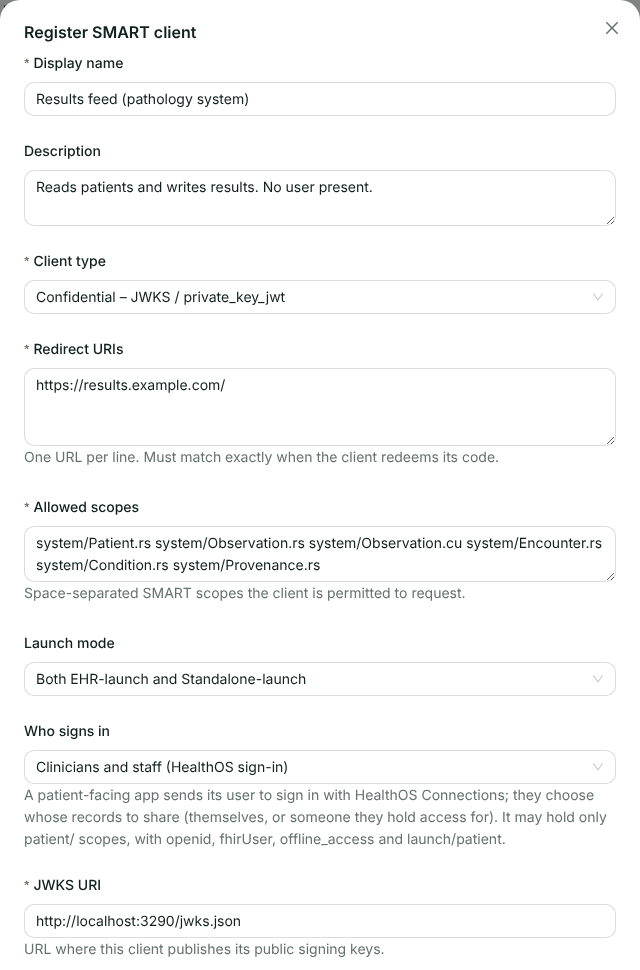
The registration for a results feed that reads patients and writes Observations. We ran it locally, so the JWKS URI here is on localhost. Click OK.
-
Send the client ID to the vendor
Provider administratorThe new row shows the Client ID, with a copy button. Send it to the vendor along with the organisation’s HealthOS address. Nothing else is secret on this side: the private key never leaves the vendor.
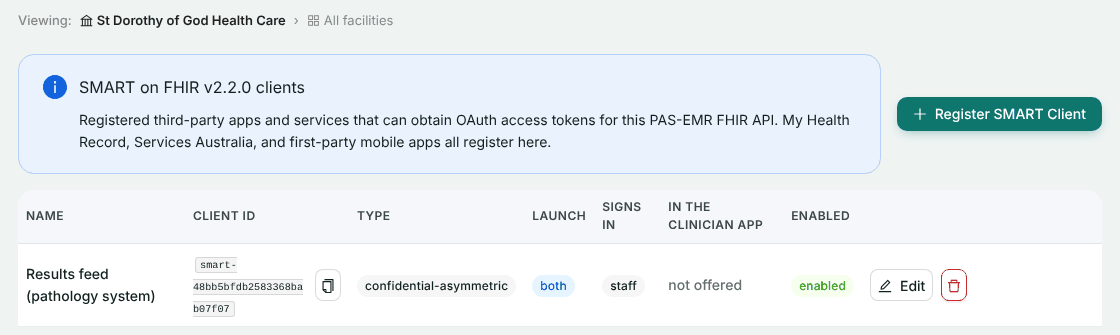
Registered and enabled. Edit changes the scopes or the JWKS URI later, and Enabled switches the client off. The bin icon deletes it. -
Sign an assertion and get a token
YouRead the token endpoint from discovery, sign a JWT naming your client ID as both
issandsuband the token endpoint asaud, and exchange it with theclient_credentialsgrant:// get-token.mjs: sign a private_key_jwt client assertion and exchange it // for a backend-services access token. Node 18 or later, no dependencies. // // HEALTHOS=https://healthos.example.org CLIENT_ID=... node get-token.mjs import { createPrivateKey, randomUUID, sign } from 'node:crypto'; import { readFileSync } from 'node:fs'; const base = process.env.HEALTHOS; // the provider's HealthOS host const clientId = process.env.CLIENT_ID; // from HealthOS Admin const scope = process.env.SCOPE ?? 'system/Patient.rs system/Observation.rs system/Observation.cu'; const jwks = JSON.parse(readFileSync('jwks.json', 'utf8')); const privateKey = createPrivateKey(readFileSync('private-key.pem')); // The token endpoint comes from discovery; the assertion's aud must equal it. const config = await (await fetch(`${base}/.well-known/smart-configuration`)).json(); const tokenEndpoint = config.token_endpoint; const b64 = (o) => Buffer.from(JSON.stringify(o)).toString('base64url'); const now = Math.floor(Date.now() / 1000); const header = { alg: 'RS384', typ: 'JWT', kid: jwks.keys[0].kid }; const claims = { iss: clientId, sub: clientId, aud: tokenEndpoint, jti: randomUUID(), iat: now, exp: now + 300, // five minutes at most }; const signingInput = `${b64(header)}.${b64(claims)}`; const signature = sign('sha384', Buffer.from(signingInput), privateKey).toString('base64url'); const assertion = `${signingInput}.${signature}`; const response = await fetch(tokenEndpoint, { method: 'POST', headers: { 'Content-Type': 'application/x-www-form-urlencoded' }, body: new URLSearchParams({ grant_type: 'client_credentials', scope, client_assertion_type: 'urn:ietf:params:oauth:client-assertion-type:jwt-bearer', client_assertion: assertion, }), }); const body = await response.json(); if (!response.ok) { console.error(response.status, body); process.exit(1); } console.log(JSON.stringify(body, null, 2));What came back for us:
HTTP/1.1 200 OK
Content-Type: application/json

{
  "access_token": "eyJhbGciOiJIUzI1NiIsInR5cCI6IkpXVCJ9…",
  "token_type": "Bearer",
  "expires_in": 3600,
  "scope": "system/Patient.rs system/Observation.rs system/Observation.cu system/Encounter.rs system/Condition.rs system/Provenance.rs"
}
The token lasts an hour and there is no refresh token. When it expires, sign a fresh assertion and ask again. You may ask for fewer scopes than you are registered for, never more. RS256, RS384, RS512, ES256, ES384 and ES512 signatures are accepted.
-
Find a patient by IHI
YouSend the token on every FHIR call. Search on the IHI with its standard identifier system:
GET /fhir/Patient?identifier=http://ns.electronichealth.net.au/id/hi/ihi/1.0|8003608166990291
Authorization: Bearer {access_token}
Accept: application/fhir+json

HTTP/1.1 200 OK
Content-Type: application/fhir+json; charset=utf-8

{
  "resourceType": "Bundle",
  "type": "searchset",
  "total": 1,
  "entry": [{
    "fullUrl": "Patient/0d72ded0-776a-445d-8476-ad0c9fdbb494",
    "resource": {
      "resourceType": "Patient",
      "id": "0d72ded0-776a-445d-8476-ad0c9fdbb494",
      "meta": { "profile": [
        "http://hl7.org.au/fhir/StructureDefinition/au-patient",
        "http://hl7.org.au/fhir/core/StructureDefinition/au-core-patient" ] },
      "identifier": [
        { "use": "usual", "type": { "text": "MRN" }, "system": "urn:healthos:mrn:local", "value": "MO-8003608166990291" },
        { "use": "official", "type": { "text": "IHI" },
          "system": "http://ns.electronichealth.net.au/id/hi/ihi/1.0", "value": "8003608166990291" },
        { "use": "official", "type": { "text": "Medicare Number" },
          "system": "http://ns.electronichealth.net.au/id/medicare-number", "value": "2954636341" }
      ],
      "active": true,
      "name": [{ "use": "official", "family": "NEVILLE", "given": ["Lisa"] }],
      "gender": "female",
      "birthDate": "1967-01-16",
      …
    },
    "search": { "mode": "match" }
  }]
}
Keep the Patient
id. You reference it when you write. The patient here is a Services Australia test identity from the demo data. -
Write an Observation
YouPost the resource to its type. An Observation needs a
status, acategory, acode, asubjectand aneffective[x]:POST /fhir/Observation Authorization: Bearer {access_token} Content-Type: application/fhir+json { "resourceType": "Observation", "status": "final", "category": [{ "coding": [{ "system": "http://terminology.hl7.org/CodeSystem/observation-category", "code": "laboratory" }] }], "code": { "coding": [{ "system": "http://loinc.org", "code": "2823-3", "display": "Potassium [Moles/volume] in Serum or Plasma" }], "text": "Potassium" }, "subject": { "reference": "Patient/0d72ded0-776a-445d-8476-ad0c9fdbb494" }, "effectiveDateTime": "2026-10-18T09:40:00+11:00", "valueQuantity": { "value": 4.6, "unit": "mmol/L", "system": "http://unitsofmeasure.org", "code": "mmol/L" } }HealthOS stores it and answers with the stored record:
HTTP/1.1 201 Created
Content-Type: application/fhir+json; charset=utf-8
ETag: W/"1792286053513"
Last-Modified: Sun, 18 Oct 2026 01:14:13 GMT
Location: https://healthos.example.org/fhir/Observation/5ac6e570-92df-492a-96c6-e7b56fef434e

{
  "resourceType": "Observation",
  "id": "5ac6e570-92df-492a-96c6-e7b56fef434e",
  "meta": {
    "profile": [ "http://hl7.org.au/fhir/StructureDefinition/au-diagnosticresult",
                 "http://hl7.org.au/fhir/core/StructureDefinition/au-core-diagnosticresult" ],
    "lastUpdated": "2026-10-18T01:14:13.513Z",
    "versionId": "1792286053513"
  },
  "status": "final",
  …
  "effectiveDateTime": "2026-10-17T22:40:00.000Z",
  "valueQuantity": { "value": 4.6, "unit": "mmol/L", "system": "http://unitsofmeasure.org", "code": "mmol/L" }
}
Times come back in UTC. Every write leaves a Provenance naming your system, which anyone with read access to Provenance can fetch:
GET /fhir/Provenance?target=Observation/5ac6e570-92df-492a-96c6-e7b56fef434e
Authorization: Bearer {access_token}

{
  "resourceType": "Bundle",
  "type": "searchset",
  "total": 1,
  "entry": [{
    "resource": {
      "resourceType": "Provenance",
      "id": "8076856b-0bac-4faa-8cd0-4d1cd49539e1",
      "target": [{ "reference": "Observation/5ac6e570-92df-492a-96c6-e7b56fef434e", "type": "Observation" }],
      "recorded": "2026-10-18T01:14:13.499Z",
      "activity": { "coding": [{ "system": "http://terminology.hl7.org/CodeSystem/v3-DataOperation",
                                 "code": "CREATE", "display": "create" }] },
      "agent": [{
        "type": { "coding": [{ "code": "performer", "display": "Performer" }] },
        "who": {
          "type": "Device",
          "identifier": { "system": "http://healthos.health/id/smart-client",
                          "value": "smart-48bb5bfdb2583368bab07f07" },
          "display": "Results feed (pathology system)"
        }
      }],
      "reason": [{ "text": "SMART on FHIR system-context write, version 1792286053513" }]
    }
  }]
}
If you retry writes, make them conditional so a retry finds the record it already made. The FHIR for systems page lists conditional create, update with
If-Match, and transaction Bundles. -
Run a bulk export
YouKick off the export asynchronously. This one asks for every patient’s Patient and Observation resources:
GET /fhir/Patient/$export?_type=Patient,Observation
Authorization: Bearer {access_token}
Accept: application/fhir+json
Prefer: respond-async

HTTP/1.1 202 Accepted
Content-Location: https://healthos.example.org/fhir/bulk-status/dfa9767d-1c03-4947-87b3-0412db2c402c
Content-Type: application/fhir+json; charset=utf-8

{"resourceType":"OperationOutcome","issue":[{"severity":"information","code":"informational",
 "diagnostics":"Export accepted. Poll https://healthos.example.org/fhir/bulk-status/dfa9767d-…."}]}
Poll the
Content-Locationwith the same token. While the job runs you get a 202 withX-ProgressandRetry-After. Wait the number of seconds it gives before the next poll.GET /fhir/bulk-status/dfa9767d-1c03-4947-87b3-0412db2c402c HTTP/1.1 202 Accepted Retry-After: 5 X-Progress: StartingWhen it finishes you get the manifest:
HTTP/1.1 200 OK
Content-Type: application/json; charset=utf-8

{
  "transactionTime": "2026-10-18T01:14:43.635Z",
  "request": "https://healthos.example.org/fhir/Patient/$export?_type=Patient,Observation",
  "requiresAccessToken": true,
  "output": [
    { "type": "Patient",
      "url": "https://healthos.example.org/fhir/bulk-files/dfa9767d-…/Patient-1.ndjson", "count": 31 },
    { "type": "Observation",
      "url": "https://healthos.example.org/fhir/bulk-files/dfa9767d-…/Observation-1.ndjson", "count": 4 }
  ],
  "deleted": [],
  "error": []
}
Download each file with the token. Each line is one resource:
GET /fhir/bulk-files/dfa9767d-1c03-4947-87b3-0412db2c402c/Observation-1.ndjson
Authorization: Bearer {access_token}
Accept: application/fhir+ndjson

HTTP/1.1 200 OK
Content-Type: application/fhir+ndjson

{"resourceType":"Observation","id":"5ac6e570-92df-492a-96c6-e7b56fef434e","meta":{"profile":[…]},"status":"final",…}
{"resourceType":"Observation",…}
When you have everything, delete the job. The files go with it. If you forget, they are deleted 24 hours after the job finished.
DELETE /fhir/bulk-status/dfa9767d-1c03-4947-87b3-0412db2c402c
Authorization: Bearer {access_token}

HTTP/1.1 202 Accepted
{"resourceType":"OperationOutcome","issue":[{"severity":"information","code":"informational",
 "diagnostics":"The export was cancelled and its files deleted."}]}
A status poll after that answers 404, “No such export (it may have expired or been cancelled).” Use
/fhir/$exportfor every exportable type in the organisation, or/fhir/Group/{facility id}/$exportfor one facility’s patients (GET /fhir/Grouplists them).
The simpler option: a client secret
If your system cannot sign JWTs, the administrator can register it as Confidential – client secret instead, with no JWKS URI. HealthOS shows the secret once, straight after OK:
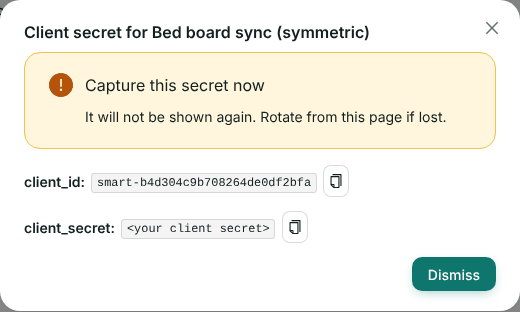
The administrator passes it to you over a channel you both trust. You then send it with HTTP Basic authentication (or as client_id and client_secret form fields):
POST /smart/token
Authorization: Basic {base64 of client_id:client_secret}
Content-Type: application/x-www-form-urlencoded

grant_type=client_credentials&scope=system/Patient.rs
The answer is the same token as above. We still prefer the key pair: a secret has to be copied between people, and a key pair never does.
Check it worked
- The token response lists exactly the scopes you asked for.
- The IHI search returns one Patient with
total: 1. - The create returns 201 with a
Location, and the Provenance search names your system by its display name. - The export manifest lists one file per type you asked for, and the
errorarray is empty. A type your scopes cannot read appears in the error file instead. - Ask the provider to open the patient in HealthOS. Your Observation appears with their other results.
If something goes wrong
These are the answers we saw, or that the server is written to give.
| What you see | Why | What to do |
|---|---|---|
401 invalid_client, “Unknown client” | The client ID is wrong, or the client was disabled | Copy the client ID again from HealthOS Admin. Check the row is enabled |
401 invalid_client, “Assertion signature verification failed” | The signature did not verify, or aud is not exactly the token endpoint from discovery, or the assertion has expired | Read token_endpoint from discovery and use it as aud. Check your clock |
401 invalid_client, “No matching key in JWKS” or “JWKS fetch failed” | The kid in your JWT header is not in your published JWKS, or HealthOS could not fetch the URL | Publish the key and wait out the ten-minute cache. Check the URL is reachable from outside your network |
400 invalid_scope, “Requested scope exceeds what this client is authorised for” | You asked for a scope the registration does not hold | Ask for less, or ask the administrator to add it |
400 invalid_scope, “client_credentials grants system/ scopes only” | You asked for a patient/ or user/ scope | Backend services use system/ scopes |
| 403 OperationOutcome, “The token’s scopes do not grant search on MedicationRequest.” | The token has no read scope for that type | Add the scope to the registration and get a new token |
| 401 OperationOutcome, “The access token is invalid or expired.” | The hour is up, or the token was mangled | Get a new token |
| 400 OperationOutcome, “Observation.category is required” | A required element is missing. The expression names it | Add the element and send it again |
| 422 OperationOutcome naming an element | HealthOS cannot store that value faithfully, so it refuses the whole resource rather than keep half of it | Change or leave out the element the outcome names |
429 with Retry-After on $export | Your previous export is still running. One runs per client at a time | Wait, or delete the old job |
Related
Want a test organisation?
Tell us which resources your system reads and writes. We’ll set up a test organisation and register your system against it with you.